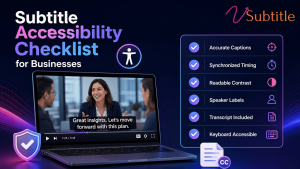
A practical, non-legalese checklist for making sure every video your business publishes actually meets 2026’s accessibility bar.
Digital accessibility lawsuits have been climbing sharply year over year, and video content — specifically, video without accurate captions — is an increasingly common target. Courts have consistently treated business websites and the video on them as places of public accommodation under the ADA, and the compliance deadlines tied to WCAG 2.1 Level AA are no longer a distant future concern: public entities serving larger populations already faced an April 2026 deadline, with smaller entities and private organizations close behind on a staggered timeline through 2027 and 2028.
None of this needs to feel like a legal minefield. Most of what “accessible subtitles” actually requires is concrete and checkable: accurate text, correct timing, the right file format, and a few structural details many teams simply haven’t been told to look for. This checklist walks through exactly what a business needs to verify, organized the way a real audit would be run, rather than as an abstract summary of regulations.
Why This Belongs on Every Business’s Checklist Now
Two separate forces are pushing accessible video from a nice-to-have into a standard operating requirement. The legal side is straightforward: digital accessibility lawsuits were tracking substantially higher in 2025 than the year before, and video without captions is a common, easily identifiable target for a complaint. The business side is arguably even more persuasive on its own: a large majority of people say they’re more likely to watch a video through to the end when captions are available, and a meaningful share of viewers use captions regularly regardless of hearing ability — driven as much by sound-off viewing habits as by any accessibility need.
| Factor | What It Means for a Business |
|---|---|
| Digital accessibility lawsuits rising sharply year over year | Video without captions is an easy, identifiable compliance gap for a complaint to target |
| WCAG 2.1/2.2 Level AA deadlines for public entities phasing in through 2026–2028 | Government, education, and healthcare organizations face hard legal deadlines, not just best-practice guidance |
| Private businesses treated as “places of public accommodation” under ADA Title III in multiple court rulings | Even without a specific statutory deadline, private businesses face active litigation risk today |
| ~87% of Americans use captions at least sometimes | Captions are now a mainstream viewing preference, not a narrow accommodation |
| A large majority of viewers report being more likely to finish a captioned video | Accessibility work and engagement performance point in the same direction, not opposite ones |
The Legal Frameworks in Plain Terms
A business doesn’t need to become a compliance expert to act correctly here, but knowing which framework applies helps set the right bar:
- ADA (Title II and III): Title II covers state and local government entities, with WCAG 2.1 Level AA formally adopted as the DOJ’s technical standard and a staggered deadline running through 2027–2028 depending on population size. Title III covers private businesses operating as places of public accommodation; courts have repeatedly ruled that this includes business websites and their video content, even without an explicit statutory captioning mandate.
- WCAG (Web Content Accessibility Guidelines): the technical standard underlying most video accessibility law. WCAG 2.2 is the current version, with Level AA as the practical target — Level A requires synchronized captions for prerecorded video specifically, since a transcript alone doesn’t satisfy the synchronization requirement video needs.
- Section 508: applies to US federal agencies and any organization receiving federal funding or contracting with the federal government, requiring accessible electronic content including video.
- EAA (European Accessibility Act): in full effect since June 2025, requiring WCAG-aligned accessibility for digital products and services offered within the EU — applicable to any business, regardless of where it’s headquartered, that serves EU customers.
For a broader walkthrough of how these frameworks fit together and what “accessible” actually means in practice, our ultimate guide to video accessibility covers the full landscape in more depth than this checklist alone.
The Core Subtitle Accessibility Checklist
Content Accuracy
- ☐ Captions meet a 97%+ accuracy threshold — the commonly cited bar for professional and legal standards, well above raw, unreviewed auto-caption output.
- ☐ All spoken dialogue is captioned, including asides, off-screen speech, and audio from any secondary speaker.
- ☐ Names, brand terms, and technical vocabulary specific to the business have been manually reviewed and corrected.
- ☐ Numbers, dates, and figures are transcribed exactly as spoken, not paraphrased or rounded.
Timing and Synchronization
- ☐ Captions are synchronized to the audio — WCAG Level A explicitly requires synchronized captions for prerecorded video, not just a static transcript.
- ☐ Reading speed stays within a comfortable range (roughly 15–20 characters per second) rather than flashing past faster than an average viewer can read.
- ☐ Each caption stays on screen long enough to be read in full, with a reasonable minimum display duration even for very short lines.
Format and Technical Delivery
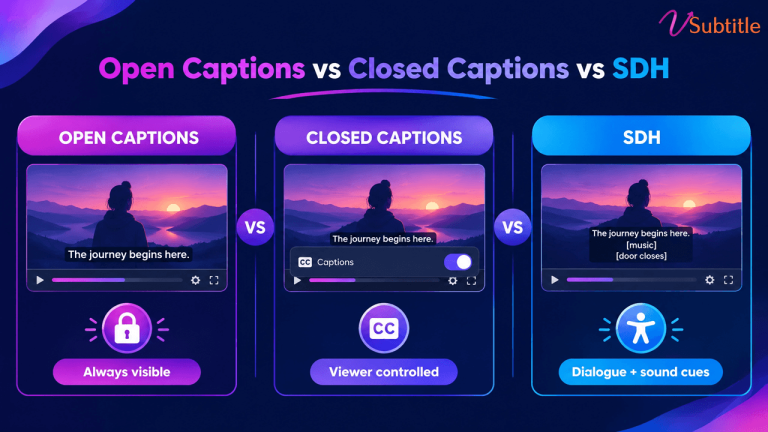
- ☐ Captions are delivered as a proper synchronized format (SRT or VTT are the most broadly compatible choices), not only burned into the video as open captions with no separate file.
- ☐ Closed captions (viewer-toggleable) are available in addition to, or instead of, open captions where the platform supports it, since not every viewer wants captions on by default.
- ☐ The video player itself is keyboard-navigable and screen-reader compatible — a common gap even on videos with otherwise excellent captions.
If your team is still deciding between subtitle file formats for different delivery contexts, our SRT vs VTT vs ASS format guide breaks down which format fits which use case.
SDH and Non-Dialogue Audio
- ☐ Key sound effects, music cues, and tone (laughter, tense pause, applause) are captioned where they carry meaning relevant to understanding the content — this is what separates SDH from standard subtitles.
- ☐ Speaker changes are clearly indicated when multiple people are speaking, especially in interviews, panels, or multi-presenter training content.
For a deeper look at what distinguishes SDH from plain subtitles and why that distinction matters for genuine accessibility, our guide to making video content deaf-friendly covers this in detail.
Supplementary Materials
- ☐ A full text transcript is published alongside the video, giving users an alternative way to access the content beyond the caption track itself.
- ☐ Audio descriptions are provided for video where visual information (on-screen text, actions, scene changes) isn’t otherwise conveyed through dialogue — a requirement that goes beyond captions but is part of the same WCAG framework.
Multilingual and Global Considerations
- ☐ For organizations serving international or EU audiences, captions exist in the language(s) content is actually delivered in, not only the organization’s primary language.
- ☐ Translated captions have been reviewed for accuracy rather than published as raw machine translation, particularly for legally or medically sensitive content.
Process and Documentation
- ☐ An inventory exists of all video content, flagging which assets currently lack captions or transcripts — the necessary first step before any remediation plan can be built.
- ☐ High-traffic and high-risk content (homepage videos, product demos, training and onboarding material, anything tied to a legally regulated process) is prioritized ahead of lower-visibility archive content.
- ☐ Records are kept of accessibility audits and remediation progress — documentation that demonstrates good-faith effort if a complaint is ever filed.
- ☐ New video content is captioned as part of the standard publishing workflow, not as a separate remediation task handled after the fact.
The Cost of Getting This Wrong vs. Getting It Right
It’s worth being direct about the numbers on both sides of this decision. Digital accessibility litigation frequently results in settlement and remediation costs well into five figures per incident, before accounting for legal fees, reputational impact, or the cost of the remediation work a court or settlement agreement may require anyway. Against that, captioning a video library with modern AI-assisted transcription tools costs a small fraction of that per video, and the same investment simultaneously improves watch-through, search visibility, and usability for the large share of viewers who use captions by preference rather than necessity.
Framed this way, subtitle accessibility isn’t really a compliance line item competing against other budget priorities — it’s closer to an unusually cheap insurance policy that also happens to improve the core metrics most video content is already trying to move. Organizations that treat it as a standard part of the publishing workflow, rather than a separate remediation project revisited only after a complaint, consistently spend less overall than those that wait.
Prioritizing a Large or Backlogged Video Library
Most businesses discover the same problem when they start this process: dozens or hundreds of existing videos with no captions at all, and no realistic way to fix all of them at once. A phased approach works better than an attempt to remediate everything simultaneously:
- Audit first. Catalog every video across the organization’s properties — website, YouTube, internal training platforms, social — and flag which ones currently lack captions or transcripts entirely.
- Rank by exposure and risk. Public-facing, high-traffic video (homepage content, flagship product demos) and legally sensitive content (training tied to compliance, healthcare or financial services material) should be captioned before low-traffic archive content.
- Caption all new content immediately, so the backlog stops growing while older content is being addressed.
- Work through the backlog in batches, using AI-assisted transcription to make the volume manageable rather than treating each video as a fully manual project.
- Re-audit periodically, since new content, platform changes, and evolving regulatory deadlines mean this isn’t a project with a single finish line.
Compliance Gaps Businesses Commonly Miss
- Treating burned-in open captions as sufficient on every platform, without also providing a proper closed-caption file where the platform and use case call for one.
- Publishing captions with no accuracy review, leaving auto-caption errors in place on content that’s legally or medically significant.
- Captioning video but shipping it inside a player that isn’t keyboard-navigable or screen-reader compatible — a WCAG failure even with perfect captions.
- Assuming private-business status exempts a company from ADA exposure, despite multiple court rulings treating business websites and video as places of public accommodation.
- Captioning only in the organization’s primary language despite serving audiences, including EU customers under the EAA, who need content in other languages.
- No documentation of accessibility efforts, leaving an organization unable to demonstrate good-faith progress if a complaint is filed.
Making This Checklist Realistic to Execute
The technical requirements above are straightforward individually, but doing them consistently — across every new upload and an existing backlog — is where most organizations fall behind, especially without a dedicated accessibility or localization team.
vSubtitle’s AI subtitle generator is built to close that gap: it produces accurate, editable captions directly from a video’s audio, supports the review pass needed to hit the 97%+ accuracy threshold this checklist calls for, and exports to SRT, VTT, TXT, and DFXP — covering the closed-caption delivery formats most compliance frameworks expect. Translation into 100+ languages extends the same workflow to multilingual and EAA-relevant content without a separate production pass for each language.
For teams building this process from the ground up, our beginner’s guide to AI subtitling is a useful starting point before tackling a full accessibility audit.
Key Takeaways
- Video accessibility has shifted from best practice to active legal exposure, with rising lawsuit volume and phased WCAG 2.1/2.2 Level AA deadlines already in effect for public entities and active litigation risk for private businesses today.
- A transcript alone doesn’t satisfy WCAG’s captioning requirement for video — synchronized, timed captions are specifically required.
- Accuracy (97%+), proper file formats, SDH-level detail for non-dialogue audio, and an accessible player are all separate requirements that need to be checked individually, not assumed from one another.
- Large video libraries are best remediated in a prioritized, phased order — audit, rank by exposure, caption new content immediately, then work through the backlog — rather than attempted all at once.
- Multilingual captioning is a real requirement, not an extra, for any organization serving international or EU audiences under the EAA.
- Accessibility and engagement point the same direction: the same captions that reduce legal risk also measurably increase watch-through and viewer preference.
None of this requires an enterprise compliance budget to get right. It requires a checklist, a prioritized plan for the backlog, and a workflow that keeps every new video accessible by default — treating captioning as a standard step in publishing, not a remediation project perpetually pushed to next quarter.
Frequently Asked Questions (FAQs)
Are businesses legally required to caption their videos?
It depends on the organization type. Public entities face explicit WCAG 2.1 Level AA deadlines under ADA Title II, phased in through 2026–2028. Private businesses don’t always have an explicit statutory captioning mandate, but courts have repeatedly ruled that business websites and their video content qualify as places of public accommodation under ADA Title III, creating real litigation risk even without a specific deadline.
Does a text transcript satisfy accessibility requirements on its own?
No, not for video. WCAG Level A specifically requires synchronized captions for prerecorded video content, since a static transcript lacks the timing information needed to follow along with the video in real time. A transcript is a valuable supplementary asset, but it doesn’t replace synchronized captions.
What accuracy level do business video captions need to meet?
97% or higher is the commonly cited threshold for professional and legal standards — well above what raw, unreviewed auto-generated captions typically achieve. A human review pass focused on names, technical terms, and numbers is usually what closes that gap.
What’s the difference between standard captions and SDH for compliance purposes?
Standard subtitles cover dialogue only. SDH additionally includes non-dialogue audio information — sound effects, music cues, and speaker identification — for viewers who can’t rely on the audio track at all. Genuine accessibility compliance generally calls for SDH-level detail, not just dialogue captions.
Do captions need to be provided in multiple languages?
For organizations serving international audiences — particularly under the EU’s Accessibility Act — yes, captions should be available in the languages the content is actually delivered in, not only the organization’s primary language. Translated captions should also be reviewed for accuracy rather than published as raw, unchecked machine translation.
How should a business tackle a large backlog of uncaptioned videos?
Start with a full inventory to identify what’s missing captions, then prioritize by exposure and risk — high-traffic public content and legally sensitive material first. Caption all new content immediately so the backlog stops growing, then work through the existing library in batches using AI-assisted transcription to manage the volume.
Can AI captioning tools help meet these accessibility requirements?
Yes, when paired with a human review step. AI tools like vSubtitle can generate accurate, editable captions and export them in the closed-caption formats most compliance frameworks expect, and translate into 100+ languages for multilingual requirements — turning what would otherwise be a slow manual process into something realistic to apply consistently across an entire video library.