

There are 430 million people worldwide living with disabling hearing loss, according to the World Health Organization. That number is expected to rise to over 700 million by 2050. Despite this, the vast majority of online video content is still inaccessible to deaf and hard-of-hearing viewers.
Making your videos deaf-friendly isn’t complicated — and in 2026, it’s never been faster or more affordable. Whether you’re a solo creator, a freelancer producing content for clients, or a business publishing educational or marketing videos, this guide covers everything you need to know to make your content accessible to everyone.
We’ll cover what deaf-friendly video actually means, the specific elements it requires, how to add them efficiently, the tools to use, and the legal considerations you should be aware of.
| 📌 Deaf-friendly video isn’t just an ethical responsibility — it’s also good content strategy. Accessible videos consistently outperform inaccessible ones on retention, SEO, and reach. |
1. What Does ‘Deaf-Friendly’ Video Actually Mean?
Many creators assume that ‘adding subtitles’ is the same as making a video deaf-friendly. It’s a great start — but truly accessible video for deaf and hard-of-hearing viewers goes further than displaying spoken words on screen.
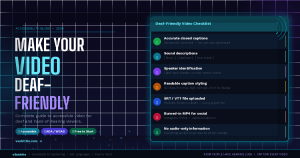
A genuinely deaf-friendly video includes:
- Accurate closed captions — not just auto-generated text, but reviewed and corrected subtitles that reflect exactly what is said
- Sound descriptions in captions — notating important non-speech audio like [upbeat music], [applause], [door slams], [phone ringing]
- Speaker identification — clearly indicating who is speaking when multiple people appear on screen
- Readable caption styling — correct font size, sufficient contrast, appropriate line length and display timing
- No critical audio-only information — everything important that is communicated via sound should also be communicated visually
| 🎧 The key distinction: subtitles translate speech into text. Closed captions for deaf viewers also describe the full audio environment — music, sound effects, tone of voice, and speaker identity. |
2. Why It Matters — Beyond Accessibility
Making content deaf-friendly is the right thing to do. But it’s worth understanding that the benefits extend well beyond ethics:
A Larger Audience
430 million people have hearing loss — but the audience for captioned content is far larger than that. Research consistently shows that over 80% of people who use captions don’t have hearing loss at all. They use captions because they’re in a noisy environment, learning a language, watching late at night, or simply prefer reading along. Deaf-friendly video serves everyone.
Better SEO and Search Visibility
Closed caption files (SRT/VTT) contain the full text of your spoken content. Search engines index this text, which means every word you speak becomes discoverable. A properly captioned video can rank for dozens of long-tail keywords that wouldn’t otherwise be associated with it.
Higher Engagement and Watch Time
Viewers who have access to captions watch longer. Studies by Facebook, YouTube, and Verizon have all found that captioned videos generate significantly more views and watch time than uncaptioned ones. Platform algorithms reward this with more organic distribution.
Legal Compliance
In many countries, captioning isn’t optional for certain types of content. The Americans with Disabilities Act (ADA), the UK Equality Act, and the EU Web Accessibility Directive all have provisions covering video captioning. Educational institutions, government bodies, and many businesses are legally required to provide accessible content. We cover this in more detail in Section 8.
Brand Reputation
Brands that visibly invest in accessibility are perceived more favourably by a broad audience — not just those directly affected. Inclusive content signals values that resonate with modern consumers.
| 💡 The business case and the ethical case for deaf-friendly video are the same case. There is no downside to making your content accessible. |
3. The Elements of Deaf-Friendly Captions
Let’s get specific. Here’s what separates a basic subtitle from a fully deaf-friendly caption:
1. Verbatim Accuracy
Captions should reflect exactly what is spoken — including filler words, false starts, and corrections where they convey meaning. Some style guides allow for light editing to improve readability, but critical information must never be omitted or paraphrased.
2. Sound Effect Descriptions
Any non-speech audio that contributes to the meaning or emotional tone of the video should be described in square brackets. Examples:
- [ Upbeat background music ]
- [ Crowd cheering ]
- [ Notification sound ]
- [ Thunder in the distance ]
- [ Laughter ]
These descriptions let deaf viewers understand the full sensory environment of the video, not just the spoken words.
3. Speaker Identification
When two or more people are speaking, captions should identify who is speaking — especially when the speaker isn’t visible on screen. Common formats include:
- Name labels: SARAH: That’s a great point.
- Dashes for speaker changes: — And I completely agree.
- Descriptive labels: [ Interviewer ] So what happened next?
4. Caption Timing and Pacing
Captions should appear on screen at the exact moment the words are spoken, and remain visible long enough to be read comfortably. A good rule of thumb is a minimum display time of 1.5 seconds per caption block, regardless of how short the spoken text is. Avoid captions that flash on and off too quickly to read.
5. Readable Formatting
Caption readability comes down to a few key rules:
- Maximum 42 characters per line
- Maximum 2 lines visible at once
- High contrast text — white or yellow on a semi-transparent dark background
- Minimum font size of 22px for web video; larger for mobile-first content
- Avoid decorative fonts — use clean, legible sans-serif typefaces
6. Music and Tone Descriptions
Where music plays a significant emotional role — in a documentary, a film, or a promotional video — it should be described. Not just [ music ] but [ soft piano music ] or [ tense orchestral score ] to convey the emotional context a hearing viewer would naturally receive.
4. Closed Captions vs. Open Captions vs. Subtitles — What to Use When
| Format | What It Is & When to Use It |
| Closed Captions (SRT/VTT) | Toggleable text file uploaded alongside the video. Ideal for YouTube, Vimeo, LinkedIn. Viewers can turn them on/off. Includes sound descriptions. Preferred for accessibility compliance. |
| Open Captions (Burned-in) | Permanently embedded in the video. Always visible. Required for Instagram, TikTok, Facebook Reels. Good for social media where platform caption support is inconsistent. |
| Subtitles | Primarily translates speech — does not typically include sound descriptions. Best for multilingual distribution, not deaf accessibility. |
| SDH Captions | Subtitles for the Deaf and Hard-of-Hearing. Combines translation with sound descriptions and speaker ID. The gold standard for deaf accessibility on film and TV. |
| Auto-Captions | Platform-generated (YouTube, TikTok). Fast and free but 70–85% accurate. Always needs review before being considered accessible — they frequently miss or misrepresent key audio. |
| ⚠️ For genuine deaf-friendly accessibility, closed captions with sound descriptions (SDH-style) are the standard to aim for. Auto-captions alone are not sufficient. |
5. How to Add Deaf-Friendly Captions Using vSubtitle (Step-by-Step)
The fastest way to add accurate, accessible captions to your videos is with an AI tool that gives you a solid base to build on — and then lets you enhance it with sound descriptions and speaker labels in an easy editor. vSubtitle is built exactly for this workflow.
| 🎁 vSubtitle gives you 100 free minutes of AI captioning — no watermark, no credit card. That’s enough to caption 6–10 standard videos completely free. |
| 🚀 Step-by-Step: Adding Deaf-Friendly Captions |
Step 1: Upload Your Video to vSubtitle
Go to vsubtitle.com, create a free account, and upload your video file (MP4, MOV, AVI, MKV) or paste in a YouTube URL. No credit card needed to get started.
Step 2: Generate AI Captions
Select your language and hit Generate. vSubtitle’s AI transcribes your speech at 95%+ accuracy and automatically syncs each caption line to the correct timestamp. For a 10-minute video, this typically takes 3–5 minutes.
Step 3: Review and Correct the Transcript
Open the built-in caption editor. Work through each line and correct any errors — paying particular attention to proper nouns, brand names, technical terms, and fast speech. This review pass typically takes 5–10 minutes for a 10-minute video.
Step 4: Add Sound Descriptions
This is the step most tools skip — but it’s essential for deaf accessibility. In the caption editor, add sound descriptions at the appropriate timestamps. For each significant non-speech audio moment, insert a new caption line with the description in square brackets:
- [ Upbeat intro music fades in ]
- [ Notification sound ]
- [ Audience applause ]
- [ Background music fades out ]
You don’t need to describe every sound — focus on sounds that carry meaning or establish emotional context.
Step 5: Add Speaker Labels (For Multi-Speaker Videos)
If your video features more than one speaker, add their name or role at the start of each caption block where a new speaker begins. This helps deaf viewers follow conversations clearly, especially during interviews, panels, or multi-person discussions.
Step 6: Check Caption Timing and Line Length
Scan through the timeline and make sure no caption lines are too long (over 42 characters) or display too briefly (under 1.5 seconds). vSubtitle’s editor makes it easy to split lines and adjust timing.
Step 7: Export
Export as:
- SRT or VTT file — for YouTube, Vimeo, LinkedIn, and website embeds (allows viewers to toggle captions on/off)
- Burned-in MP4 — for Instagram, TikTok, Facebook, and any platform that doesn’t support external caption files
6. Platform-by-Platform: Deaf-Friendly Best Practices
| Platform | Deaf-Friendly Best Practice |
| YouTube | Upload SRT file via YouTube Studio. Include sound descriptions in your SRT. YouTube also auto-generates captions — always review and replace with your corrected version. |
| Instagram Reels | Export burned-in MP4 with captions and sound descriptions embedded. Instagram has limited support for caption files — burned-in is the reliable option. |
| TikTok | Use TikTok’s Auto Captions then edit thoroughly, OR upload a burned-in MP4. TikTok’s auto-captions often miss sound effects entirely — add them manually. |
| Upload SRT file when publishing video. LinkedIn’s professional audience includes many viewers who watch on mute in office environments. | |
| Upload SRT via Video Manager. Facebook auto-captions exist but are less accurate than YouTube’s — always use your own file. | |
| Vimeo | Upload VTT or SRT via Video Settings. Vimeo supports multiple caption tracks — consider uploading both a standard subtitle version and a full SDH version. |
| Online Courses | All eLearning video must have closed captions under WCAG 2.1 AA guidelines. Use SRT/VTT files. Many LMS platforms (Teachable, Thinkific, Kajabi) support caption file uploads. |
| Website Video | Use the HTML5 <track> element with a VTT file. Ensure your video player displays captions by default for accessibility compliance. |
7. Common Mistakes That Make Captions Less Accessible
Even well-intentioned creators make these errors. Here’s what to watch out for:
Relying on Auto-Captions Without Review
Platform auto-captions (YouTube, TikTok, Facebook) are a useful starting point, but they should never be your final accessibility solution. They typically achieve 70–85% accuracy — meaning one error in every 6–8 words. For deaf viewers relying entirely on captions to follow your content, this level of error significantly degrades comprehension. Always review and correct.
Omitting Sound Descriptions
The most common gap in creator-generated captions is the absence of sound descriptions. A video where music swells dramatically, where a door slams, or where the audience laughs communicates a completely different experience to a hearing viewer vs. a deaf viewer without those descriptions. Take the extra 5 minutes to add them.
Captions That Are Too Fast
Caption lines that appear for less than 1 second, or that change so rapidly a viewer can’t read them, create an inaccessible experience even when the text is accurate. The standard guideline is a maximum reading speed of 17 characters per second — meaning longer lines need more display time.
Poor Contrast
White text on a light background, or yellow text on a bright background, is unreadable for many viewers. The minimum contrast ratio for accessible text is 4.5:1 (WCAG AA standard). White or yellow text on a dark semi-transparent background consistently meets this bar.
Not Identifying Speakers
In interview, panel, or conversation-format videos, deaf viewers need to know who is speaking. Without speaker labels, captions become a confusing stream of unattributed dialogue. This is especially important when speakers are off-screen.
Ignoring Captions on Short Videos
Short-form content — 30-second Reels, TikToks, promotional clips — is often skipped for captioning. But these are precisely the formats most likely to be watched on mute, in public, and by a broad audience. Short videos arguably need captions more than long ones.
8. Legal Requirements: What You Need to Know
Depending on your country, your content type, and your audience, captioning may be a legal obligation — not just a best practice.
United States — ADA & Section 508
The Americans with Disabilities Act (ADA) requires that video content on websites be accessible to people with disabilities, including those with hearing loss. This applies to businesses, educational institutions, and government bodies. Section 508 of the Rehabilitation Act specifically mandates captions for federal agencies and organisations receiving federal funding. Courts have consistently upheld that inaccessible video content constitutes a form of discrimination.
United Kingdom — Equality Act 2010
The UK Equality Act 2010 requires organisations to make reasonable adjustments to ensure their services are accessible to disabled people. For digital video content, this typically means providing captions. Ofcom also mandates captioning for broadcast television — a standard increasingly expected of online video publishers.
European Union — Web Accessibility Directive
The EU Web Accessibility Directive requires public sector bodies to ensure their websites and mobile apps meet WCAG 2.1 AA accessibility standards — which includes providing captions for all pre-recorded audio and video content. Private sector organisations are increasingly subject to similar requirements under the European Accessibility Act (EAA), which takes full effect in 2025.
Global — WCAG 2.1 AA Standard
The Web Content Accessibility Guidelines (WCAG) 2.1 Level AA is the internationally recognised benchmark for digital accessibility. For video, it requires captions for all pre-recorded audio content, and recommends audio descriptions for visual content. Meeting WCAG 2.1 AA is considered the minimum acceptable standard for accessible video publishing globally.
| ⚖️ Legal note: This guide provides general information and is not legal advice. If you’re unsure whether specific captioning obligations apply to your content or organisation, consult a qualified accessibility or legal professional. |
9. Deaf-Friendly Video Checklist
Use this checklist before publishing any video to ensure it meets deaf-friendly accessibility standards:
| ✅ Pre-Publish Accessibility Checklist |
| ☐ | Captions have been generated (AI or manual) and reviewed for accuracy |
| ☐ | Proper nouns, brand names, and technical terms have been checked and corrected |
| ☐ | Sound effect descriptions are included in square brackets at the correct timestamps |
| ☐ | Speaker labels are added for all multi-speaker sections |
| ☐ | No caption line exceeds 42 characters |
| ☐ | All caption lines display for a minimum of 1.5 seconds |
| ☐ | Caption contrast is sufficient (white or yellow on dark semi-transparent background) |
| ☐ | Music is described where it plays a significant emotional or narrative role |
| ☐ | SRT or VTT file has been uploaded to the platform (YouTube, Vimeo, LinkedIn) |
| ☐ | Burned-in MP4 has been exported for social platforms that don’t support caption files |
| ☐ | Captions have been spot-checked at 3 random points in the video for timing accuracy |
| ☐ | No critical information is communicated through audio alone without a visual equivalent |
10. Frequently Asked Questions
Are subtitles and closed captions the same thing?
Not exactly. Subtitles primarily translate speech into text — they’re designed for viewers who can hear the audio but don’t speak the language. Closed captions are designed for deaf and hard-of-hearing viewers and include not just dialogue but also descriptions of non-speech audio like music, sound effects, and ambient noise. For deaf accessibility, closed captions are the correct standard.
Do I need to caption short videos or social media clips?
Yes — arguably more so than long-form content. Short-form videos on Instagram, TikTok, and Facebook are far more likely to be watched on mute and in environments where audio isn’t possible. The accessibility need doesn’t diminish with video length. The effort to caption a 30-second clip is also minimal compared to the benefit.
How do I add sound descriptions in vSubtitle?
In vSubtitle’s caption editor, you can insert new caption lines at any point in the timeline. Position your cursor at the relevant timestamp, create a new line, and type your sound description in square brackets — for example [ upbeat music ] or [ door slams ]. These will be included in your exported SRT or VTT file.
What’s the difference between SDH captions and regular captions?
SDH stands for Subtitles for the Deaf and Hard-of-Hearing. SDH captions include speaker identification, sound effect descriptions, and music notations — making them a complete accessibility solution rather than just a speech transcript. Regular auto-generated captions typically only capture spoken dialogue. vSubtitle lets you build SDH-quality captions by adding these additional elements manually in the editor.
Is my website legally required to have captioned video?
It depends on your country, your organisation type, and your audience. In the US, ADA obligations apply to businesses open to the public. In the EU, the Web Accessibility Directive and European Accessibility Act set specific requirements. In the UK, the Equality Act applies. If you’re unsure whether you have specific legal obligations, consult a qualified accessibility professional.
How accurate does AI captioning need to be for accessibility?
The FCC (US Federal Communications Commission) and WCAG guidelines both point to a high accuracy standard — errors should be rare and should not impede comprehension. In practice, this means AI-generated captions should always be reviewed and corrected before being published as an accessibility solution. vSubtitle’s 95%+ accuracy gives you an excellent base, but a review pass is still best practice.
H2 Making Deaf-Friendly Video Is Easier Than You Think
Truly accessible video — one that a deaf viewer can watch and fully understand — requires more than just auto-generated subtitles. But it doesn’t require hours of extra work. With the right tool and a clear process, you can go from an uncaptioned video to a fully deaf-friendly one in under 20 minutes.
Here’s what that process looks like with vSubtitle:
- Upload your video and generate AI captions
- Review and correct the transcript (5–10 minutes)
- Add sound descriptions and speaker labels
- Check timing and line length
- Export SRT for platforms and burned-in MP4 for social
That’s a complete, accessible, deaf-friendly video — created in the time it would take to make a cup of coffee. And with vSubtitle’s free 100-minute plan, your first several videos cost nothing at all.
| 🎬 Start Captioning for Free — No Credit Card Needed 100 free minutes. No watermark. Deaf-friendly captions in under 20 minutes. Create your free account at vsubtitle.com |
