Why Closed Captions Are Now a Legal Requirement for Online Courses (2026)
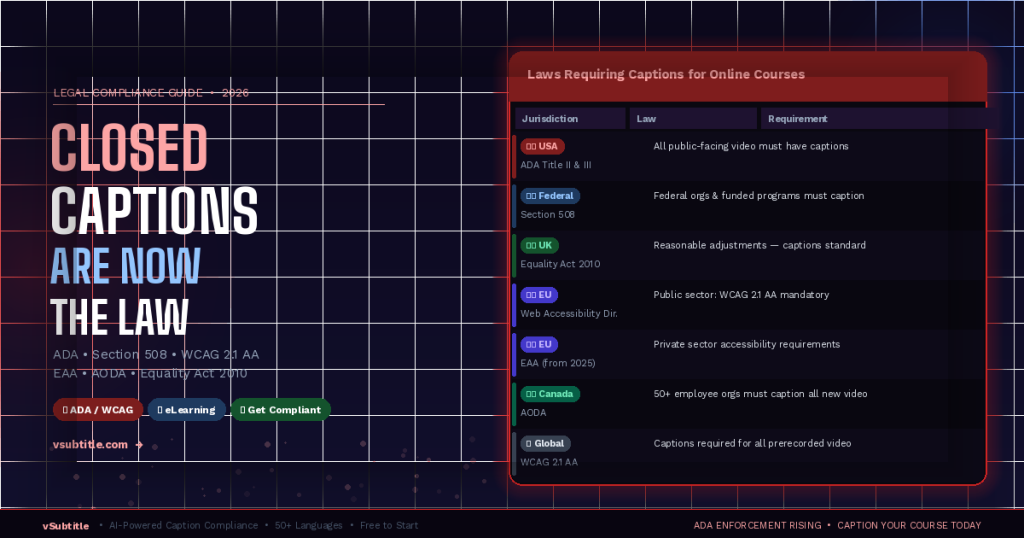
If you create, sell, or host online courses, this is the compliance update you cannot afford to ignore. Across the United States, the United Kingdom, the European Union, and beyond, accessibility laws have been updated, enforced, and in many cases strengthened in recent years. For online course creators and eLearning platforms, the message is now unambiguous: closed captions are not optional. They are a legal requirement. Lawsuits against universities, eLearning platforms, and individual course creators have multiplied. Regulatory bodies are issuing compliance notices. Courts have consistently ruled that inaccessible digital content — including video courses without captions — constitutes unlawful discrimination under disability law. The good news: compliance is faster and more affordable than it has ever been. This guide covers the legal landscape clearly, explains exactly who is affected, and shows you how to get compliant using vSubtitle — in a fraction of the time you might expect. ⚠️ Legal disclaimer: This article provides general educational information about accessibility laws. It is not legal advice. If you have specific compliance questions or face legal proceedings, consult a qualified accessibility lawyer or compliance professional. 1. The Legal Landscape: Laws That Require Captions for Online Courses Captioning requirements for online courses don’t come from a single law — they flow from multiple overlapping legal frameworks across different jurisdictions. Here’s what applies and to whom: Jurisdiction Law / Standard Caption Requirement Non-Compliance Risk USA ADA (Title II & III) All pre-recorded video must have accurate closed captions Lawsuits, OCR complaints, injunctions, fines USA (Federal) Section 508 Federal agencies & federally funded orgs must caption all video content Loss of federal funding, compliance orders USA (Education) IDEA / HEA Educational institutions receiving federal funds must provide accessible content Loss of federal education funding UK Equality Act 2010 Reasonable adjustments required; captioned video is standard expectation Tribunal claims, compensation orders EU Web Accessibility Directive Public sector bodies must meet WCAG 2.1 AA — captions mandatory for all pre-recorded video Enforcement action, public reporting EU European Accessibility Act (EAA) Private sector companies must meet accessibility standards from June 2025 Fines, market access restrictions Global WCAG 2.1 AA Captions required for all pre-recorded audio/video content Referenced in most national laws globally Canada AODA Organisations with 50+ employees must caption all new video content Fines up to CAD $100,000/day ⚖️ The trend across all jurisdictions is unmistakeable: captions are moving from ‘best practice’ to ‘legal obligation’ — and enforcement is increasing year over year. 2. Who Is Affected — Are You Required to Caption? One of the most common questions course creators ask is: “Does this apply to me?” The answer depends on your organisation type, funding, and audience — but the scope is broader than most people assume. Universities and Higher Education Institutions Any university or college that receives federal funding in the US — which covers virtually all accredited institutions — is legally required to provide accessible course content under Section 504 of the Rehabilitation Act, the ADA, and the Higher Education Act. This includes all online courses, recorded lectures, and video-based learning materials. The Department of Education’s Office for Civil Rights (OCR) has issued hundreds of resolution agreements with universities over accessibility failures, with captioning consistently cited as a primary concern. ⚠️ Dozens of US universities — including Harvard, MIT, and major state systems — have faced OCR complaints and legal action over uncaptioned course video content. Settlements have included commitments to retrospectively caption thousands of hours of existing content. K-12 Schools and School Districts Public schools receiving federal funding are covered by Section 504 and the Individuals with Disabilities Education Act (IDEA). Any video-based instructional content — including content assigned for homework, remote learning, or supplemental study — must be accessible to students with hearing disabilities. This obligation extends to third-party video content assigned by teachers if the school directs students to watch it. Commercial eLearning Platforms and Course Marketplaces Platforms like Teachable, Kajabi, Thinkific, Udemy, and Coursera — and the individual instructors who sell courses through them — are increasingly subject to ADA Title III requirements, which apply to places of public accommodation. Multiple federal courts have ruled that websites and online services qualify as places of public accommodation under the ADA. This means commercial course platforms and their content must meet accessibility standards. 📌 ADA Title III applies to any business that serves the public — including online course creators who sell to the general public. You do not need to be a large organisation or receive government funding for these obligations to apply. Corporate Training Departments Section 508 of the Rehabilitation Act applies to federal agencies and organisations that receive federal contracts or funding. For any organisation that creates internal training video content and receives federal funding — including contractors, grantees, and many private sector organisations — captioning of all video training materials is a legal requirement, not a recommendation. Individual Course Creators and Freelancers If you sell online courses to the public — whether through a marketplace or your own platform — ADA Title III increasingly applies to your content. While enforcement against individual creators has historically been lower than against large institutions, this is changing. Class-action accessibility lawsuits targeting online businesses have increased significantly, and course creators with substantial audiences are increasingly named in complaints. ⚠️ A ‘small creator’ defence does not provide reliable legal protection under the ADA. Courts have found that the ADA applies regardless of business size when a service is offered to the public. 3. What the Law Actually Requires — The Technical Standard Understanding that captions are required is step one. Understanding what the law considers acceptable captions is equally important — because not all captions meet the legal standard. WCAG 2.1 AA: The Benchmark The Web Content Accessibility Guidelines (WCAG) 2.1 Level AA is the internationally recognised technical standard referenced in most accessibility laws. For video, the relevant criteria are: Crucially, WCAG 2.1 AA defines what counts as adequate captions. Auto-generated captions that haven’t been reviewed and corrected do not reliably