Open a streaming menu and you’ll see “English,” “English [CC],” and “English SDH” listed like three flavors of the same thing. They’re not — and mixing them up in a delivery brief is one of the more expensive mistakes in video production.
“Captions,” “subtitles,” and “SDH” get used interchangeably in everyday conversation, but they describe genuinely different things — different content, different technical delivery, and in many cases, different legal requirements. The confusion isn’t just semantic. Deliver translated subtitles when a broadcaster specifically asked for closed captions, and the file gets rejected, because it’s missing the non-speech audio information a deaf viewer actually needs. Caption use overall has grown enormously in recent years — by some measures over 500% since 2021 — which means more teams than ever are producing these files without necessarily knowing which one they’re supposed to be making.
This guide breaks the three terms apart cleanly: what each one actually contains, how each is technically delivered, when each is legally required, and how to decide which one a given piece of content actually needs.
Two Separate Questions Hiding Inside These Labels
Most of the confusion clears up once it’s clear that “open vs. closed” and “captions vs. subtitles vs. SDH” are actually answering two different questions:
- What does the text contain? This is the captions-vs-subtitles-vs-SDH question — dialogue only, or dialogue plus sound effects and speaker identification.
- Can the viewer turn it off? This is the open-vs-closed question — text burned permanently into the video image, or a separate track the viewer can toggle on or off.
These two questions are independent of each other. A file can be closed (toggleable) and contain subtitle-only content, or closed and contain full caption-level detail, or — as with SDH — be delivered as a subtitle-style file that actually carries caption-level content. Keeping the two questions separate is the single fastest way to stop the terms from blurring together.
Open Captions
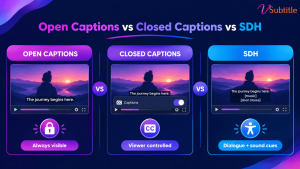
Open captions are burned permanently into the video image itself. There’s no separate track and no toggle — the text is part of the picture, indistinguishable from the rest of the frame to the video player. Whoever watches the video sees the captions; there’s no way to turn them off.
This is the format used almost universally across TikTok, Reels, and YouTube Shorts content, precisely because it guarantees the text shows up regardless of device, app, or whether a viewer even knows captions exist as a feature to enable. For a format built around muted, scroll-past viewing, that guarantee is the entire point — a viewer who scrolls past with the sound off sees the text immediately, with zero extra steps.
Open captions are also gaining ground beyond social video specifically: several US states and cities have passed legislation requiring movie theaters to offer a set number of open-caption screenings, reflecting a push to make accessibility the default experience in at least some showings rather than something that requires a special device.
For creators producing vertical social content where open captions are standard, our Instagram Reel caption generator is built specifically around this burned-in format and the safe-zone placement it requires.
Closed Captions (CC)
Closed captions are stored as a separate track from the video and decoded on request — the viewer can toggle them on or off, and they’re delivered as caption data rather than baked into the video image. Content-wise, closed captions are built for viewers who can’t hear the audio at all: they include not just dialogue, but speaker identification, sound effects, and music cues — everything a hearing viewer would otherwise pick up from the audio track itself.
Closed captions carry real legal weight in the US specifically. The 21st Century Communications and Video Accessibility Act (CVAA) requires that video previously aired on television include closed captions when distributed online, following broadcast technical standards like CEA-608 or CEA-708, enforced by the FCC. This is distinct from WCAG-driven web accessibility requirements, which apply more broadly to any prerecorded video with synchronized audio, regardless of broadcast history.
SDH: Subtitles for the Deaf and Hard of Hearing
SDH is where the content question and the delivery question intersect in a way that trips people up the most. SDH delivers caption-level content — dialogue, sound effects, speaker labels — inside a subtitle-style file format, rather than through a broadcast-style closed-caption track. It was created specifically to bridge a gap traditional subtitles couldn’t fill: subtitles assume the viewer can hear everything except the dialogue, while SDH assumes the viewer can’t hear any of it, but still gets delivered in the more flexible, easily portable subtitle file format.
This is why streaming platforms overwhelmingly use SDH rather than traditional broadcast-style closed captions: subtitle files travel far more easily across different streaming apps and devices than a broadcast CC signal does, and SDH — unlike traditional closed captions — can also be translated into other languages while retaining its full caption-level content. On a service like Netflix, what’s often labeled “English [CC]” in the menu is, technically, SDH.
For a deeper look at why this distinction matters for genuine accessibility — not just technical compliance — our guide to making video content deaf-friendly covers what separates a merely-present caption track from one that actually serves a deaf or hard-of-hearing viewer well.
Side-by-Side Comparison
| Factor | Open Captions | Closed Captions (CC) | SDH |
|---|---|---|---|
| Can the viewer turn it off? | No — burned into the video | Yes — separate toggleable track | Yes — separate toggleable track |
| Content included | Varies by use — often dialogue only | Dialogue, speaker IDs, sound effects | Dialogue, speaker IDs, sound effects |
| Can it be translated? | Rarely, without a new burned-in version | Not typically | Yes — a key advantage over traditional CC |
| Common file formats | Burned-in MP4 (no separate file) | SCC, CEA-608/708 | TTML, SRT, VTT (subtitle-style formats) |
| Typical use case | Social video (TikTok, Reels, Shorts), some theater screenings | US broadcast and previously-aired content distributed online | Streaming platforms (Netflix, Amazon Prime Video, and similar) |
| Governed by | Platform norms, some local theater legislation | CVAA / FCC (for prior-broadcast content) | Platform-specific delivery specs; WCAG-aligned |
Which One Do You Actually Need?
The right choice depends on the platform, the audience, and — increasingly — the specific legal framework the content falls under, rather than a single universal answer:
- Short-form social video (TikTok, Reels, Shorts): open captions, since the format guarantees visibility for the large share of viewers scrolling with sound off and no expectation of toggling anything on.
- Streaming or on-demand platforms: SDH, following whatever platform-specific delivery spec applies — this is what most major streamers expect for accessibility content, delivered as a subtitle-style file rather than a broadcast CC track.
- US broadcast content, or web-distributed video that previously aired on TV: closed captions meeting CEA-608/708 standards, to satisfy CVAA requirements specifically.
- Content aimed at hearing viewers who don’t speak the source language: standard subtitles — dialogue translation only, no added sound or speaker information, since the audience can already hear everything else.
- Anything published on a business website with prerecorded audio: closed captions or SDH meeting WCAG 2.1 Level AA (Success Criterion 1.2.2 specifically requires captions for prerecorded audio in synchronized video), regardless of whether the content ever aired on broadcast TV.
For a fuller walkthrough of how these accessibility requirements fit together across platforms and regulatory frameworks, our ultimate guide to video accessibility covers the broader compliance landscape this decision sits inside.
File Formats by Type
Getting the content type right doesn’t guarantee the delivery format is also correct — platforms and broadcast standards each expect specific file types:
- Open captions: no separate file at all — delivered as a burned-in video file (typically MP4), since the text is part of the image itself.
- Closed captions: SCC or CEA-608/708-compliant formats for US broadcast submissions specifically.
- SDH and general streaming subtitles: TTML is the standard for major platforms like Netflix and Amazon Prime Video, each following its own internal specification; SRT and VTT remain the most broadly compatible general-purpose formats for platforms like YouTube.
For a closer look at how these general-purpose subtitle formats differ from each other technically, our SRT vs VTT vs ASS format guide is a useful companion to this section.
Common Mistakes That Come From Mixing These Up
- Delivering translated subtitles when a broadcaster or platform specifically requested closed captions — the file gets rejected for missing sound-effect and speaker-ID information a deaf viewer needs.
- Assuming “SDH” and “closed captions” are the same technical deliverable, when they differ in file format and translatability even though their content overlaps significantly.
- Using open captions for content that also needs to serve viewers who don’t want captions on by default, removing the choice entirely for an audience that would otherwise prefer to toggle them off.
- Assuming CVAA/broadcast-style closed-caption obligations cover WCAG web accessibility requirements, when web-published video with no broadcast history is governed by a separate standard (WCAG 2.1 Level AA) regardless of CVAA status.
- Treating a single caption file as sufficient across every platform a video is published to, when different platforms expect different formats (TTML for major streamers, SRT/VTT for YouTube, burned-in for social) from what may need to be functionally the same content.
A Practical Workflow for Producing the Right Type
- Identify the platform and audience first, before producing anything — this determines whether open, closed, or SDH is actually needed, not a default habit from the last project.
- Start from an accurate, reviewed transcript regardless of final format, since every version — open, closed, or SDH — is built from the same underlying accurate text.
- Add non-speech audio information (sound effects, speaker labels, music cues) whenever the deliverable needs to serve viewers who can’t hear the audio at all — this is what separates true captions and SDH from plain subtitles.
- Export to the format the destination platform actually expects — burned-in for social video, TTML for major streaming platforms, SCC/CEA for US broadcast, SRT/VTT for general web and YouTube use.
- Confirm translatability requirements up front, since SDH can be translated while traditional broadcast-style closed captions typically cannot without a separate production process.
vSubtitle’s AI subtitle generator starts every project from the same accurate transcript foundation, then exports to SRT, VTT, TXT, and DFXP — covering the formats most platforms outside broadcast-specific delivery expect — with translation into 100+ languages for SDH and subtitle use cases specifically. For teams building out a captioning process from scratch, our beginner’s guide to AI subtitling is a useful starting point before tackling platform-specific delivery requirements.
Key Takeaways
- “Open vs. closed” and “captions vs. subtitles vs. SDH” answer two separate questions: whether the viewer can toggle the text off, and what content the text actually contains.
- Open captions are burned permanently into the video with no toggle — standard for TikTok, Reels, and Shorts, and increasingly required at some movie theater screenings by local legislation.
- Closed captions include full audio information (dialogue, sound effects, speaker IDs) as a toggleable track, and are legally required under the CVAA for content that previously aired on US broadcast TV.
- SDH delivers the same caption-level content as closed captions but in a more portable, often-translatable subtitle file format — the standard choice for most streaming platforms.
- The right choice depends on platform and audience: open for social video, SDH for streaming, broadcast-standard closed captions for prior-TV content distributed online, and WCAG-compliant captions or SDH for any business website with prerecorded audio.
- Getting the content type right doesn’t guarantee the file format is correct — each platform and standard expects its own specific delivery format, from burned-in MP4 to TTML to SCC.
None of these three formats is universally “better” than the others — they solve different problems for different audiences. Knowing which problem a specific piece of content actually needs to solve is what turns this from a confusing set of overlapping terms into a straightforward production decision.
Frequently Asked Questions (FAQs)
What’s the main difference between open captions and closed captions?
Open captions are burned permanently into the video image and can’t be turned off. Closed captions are stored as a separate, toggleable track that the viewer can enable or disable through the video player. This distinction is about control, not content.
Is SDH the same thing as closed captions?
They’re closely related but not identical. Both include full audio information — dialogue, sound effects, speaker identification — but SDH is delivered as a subtitle-style file format (like TTML or SRT) rather than a broadcast-standard closed-caption track, and SDH can typically be translated into other languages, while traditional closed captions usually cannot.
Why do streaming platforms use SDH instead of traditional closed captions?
Subtitle-style files travel more easily across the many different streaming apps and devices a platform needs to support than a broadcast-standard CC signal does, and SDH’s translatability lets one underlying caption track support multiple languages, which traditional closed captions don’t support in the same way.
Are closed captions legally required for all video content?
It depends on the content’s history and where it’s published. The CVAA requires closed captions specifically for content that previously aired on US broadcast television and is now distributed online. Separately, WCAG 2.1 Level AA (referenced by many accessibility laws) requires captions for prerecorded video with synchronized audio more broadly, regardless of broadcast history.
Why do TikTok and Instagram creators use open captions instead of closed captions?
Open captions guarantee the text is visible to every viewer immediately, with no toggle required — critical for a platform where most viewing happens muted and scrolling. A closed-caption track a viewer has to manually enable would miss most of that same audience.
Can I deliver subtitles when a client or platform asked for closed captions?
No — this is one of the most common and costly mistakes in captioning work. Subtitles translate dialogue only and assume the viewer can hear everything else. Closed captions and SDH include the non-speech audio information (sound effects, speaker IDs) that a deaf or hard-of-hearing viewer specifically needs, and a subtitle-only file delivered in place of captions will typically be rejected.
Do I need different caption files for different platforms?
Often yes. Major streaming platforms commonly require TTML following their own internal specification, US broadcast submissions require SCC or CEA-compliant formats, and YouTube and most general web use accepts SRT or VTT. The same underlying content frequently needs to be exported in multiple formats depending on where it’s being delivered.