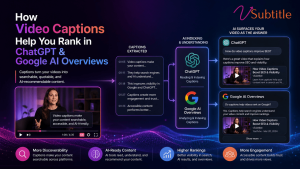
AI search engines don’t watch your video. They read it — and captions are the text they’re reading.
Search has quietly split in two. There’s still the classic ten blue links, but increasingly, the first thing a searcher sees is a generated answer — an AI Overview at the top of Google, a synthesized response inside ChatGPT, a cited summary in Perplexity. Industry estimates now put the majority of search queries running through some kind of AI-enhanced interface, and that answer layer works on different rules than the ranking system video creators spent the last decade learning.
Here’s the part that surprises most video teams: large language models don’t watch video. They can’t sit through eight minutes of footage and extract meaning the way a human viewer does. What they can do is read — and the single biggest thing standing between your video and an AI citation is whether there’s clean, accurate text attached to it. That text is your captions and transcript. This article covers exactly why that text matters, what the current data shows about it, and the specific steps that turn a captioned video into a source AI systems actually cite.
Why AI Search Changed the Rules for Video
For years, video SEO meant optimizing for a ranking position — get into the top of the video carousel, win the featured snippet, land on page one. AI Overviews and chat-based answer engines introduced a different prize: the citation. Instead of a list of links, the searcher gets a synthesized answer with a handful of sources named or linked underneath it. Being ranked well still matters — research analyzing hundreds of thousands of keywords found that the vast majority of AI Overviews cite at least one source from within the top twenty organic results — but ranking alone no longer guarantees a citation, and a citation is now worth more than a ranking position that nobody reads down to.
Video sits in an unusually strong position inside this new layer. Google actively surfaces video directly inside AI Overviews and AI Mode, and answer engines like ChatGPT, Gemini, and Perplexity increasingly reference YouTube videos by reading their transcripts to understand what’s covered. One large-scale study of thousands of brands found that mentions in YouTube video titles and transcripts were the single strongest correlating signal with AI Overview visibility of every signal measured — stronger than backlinks, stronger than domain authority. That’s a striking result, and it points to one conclusion: the text layer wrapped around your video is doing more ranking work than the video itself.
LLMs Don’t Watch Video — They Read It
It’s worth being precise about what’s actually happening under the hood. When ChatGPT, Perplexity, or Google’s AI systems encounter a page with an embedded video, they aren’t decoding the pixels or listening to the audio track in any meaningful way. They’re processing whatever text is attached to that video: the title, the description, the surrounding page copy, structured data — and, critically, the transcript or caption file, if one exists and is accessible as machine-readable text rather than baked into the video frame as burned-in graphics.
That means every word your presenter says on camera is invisible to an AI system unless it’s been converted into text the system can crawl. A brilliant, information-dense video with no caption file is functionally mute to an LLM — it has a title and a thumbnail and nothing else to go on. A mediocre video with a clean, accurate, well-structured transcript hands the model exactly what it needs to understand, quote, and cite the content. Between those two, the second video wins the citation every time, regardless of production value.
The practical translation: captions and transcripts aren’t just an accessibility feature anymore. They are the primary channel through which AI search systems understand what your video actually says.
How Google’s AI Overviews Read Your Video
Google’s video indexing system works by crawling your video sitemap, reading any structured data on the page, and analyzing the transcript. A 2025 update to Google’s core systems — reported to unify several of its language-understanding models — extended this to compare what a video’s metadata claims against what’s actually spoken in it. If a title promises one topic and the spoken content never addresses it, that mismatch is now detectable and can work against the page. In other words, your spoken words and your written metadata increasingly need to agree with each other, and the caption file is what lets Google check.
Three technical elements determine whether Google can use that transcript for an AI Overview citation:
- VideoObject schema on the page, with the transcript, title, description, thumbnail, and duration filled in as structured data — this is the machine-readable layer AI systems trust most, because it’s explicit rather than inferred.
- A crawlable transcript, published as real text on the page (not locked inside the video player or rendered only as an image), ideally with an accompanying summary or FAQ section near the embed.
- A video sitemap and an indexable page — if the page is blocked from crawling or the video isn’t the primary content of the page, none of the above matters.
Pages that combine all three — a properly captioned video, a visible transcript, and valid schema — are the ones showing up as supporting citations inside AI Overviews. Each piece alone helps a little; together, they compound.
How ChatGPT and Other Answer Engines Source Video Content
ChatGPT doesn’t have a native way to “watch” a video link and extract its content reliably — when it references a YouTube video, it’s typically working from caption or transcript data that’s already attached to that video, either pulled directly or via a browsing tool. If a video has no captions available, tools built on top of ChatGPT generally can’t summarize or cite it at all; several video-to-text tools built specifically for this workflow exist for exactly that reason — because ChatGPT’s reliability drops sharply the moment there’s no existing transcript to work from.
This is a meaningfully different failure mode than traditional SEO. A page with thin content might still rank poorly but exist in the index. A video with no captions is often simply invisible to an AI system attempting to answer a question your video actually answers well — not because the content is wrong, but because there was no text for the model to find.
What the Data Shows
| Finding | What It Means for Captions |
|---|---|
| Brand mentions in YouTube titles/transcripts are the strongest single correlating signal with AI Overview visibility (Ahrefs, 75,000-brand study) | Your transcript is effectively doing keyword and entity work that used to belong to on-page copy alone |
| 97% of AI Overviews cite a source from within the top 20 organic results (SeoClarity, 432,000 keywords) | Traditional ranking fundamentals still gate AI visibility — captions support both at once |
| Content combining text with video/images shows 156% higher AI Overview selection rates | A captioned video plus a text transcript on the same page is a multi-modal signal AI systems weight heavily |
| Pages with VideoObject schema are indexed up to 3x faster for video content | Schema plus a transcript is the fastest path from publish to eligible-for-citation |
The Caption Optimization Checklist for AI Search
1. Start With Accuracy, Not Just Coverage
Auto-generated captions with unreviewed errors don’t just look unprofessional — they actively corrupt the text an AI system reads. A misheard product name, statistic, or technical term becomes the version of your content that gets indexed and potentially cited. Always review and correct auto-generated captions before publishing, particularly for names, numbers, and jargon specific to your niche.
2. Publish a Readable Transcript on the Page, Not Just a Caption File
A closed caption track embedded in a video player is easy for a human viewer to toggle on, but it isn’t always the easiest thing for a crawler to reach. Pairing your video with a visible, on-page transcript — plain text a search engine or AI crawler can read directly, without needing to parse a video player — gives you a second, more reliable path into the index.
3. Structure the Transcript, Don’t Just Dump It
A wall of unbroken transcript text is technically readable but hard for an AI system to extract a clean, quotable answer from. Break long transcripts into labeled sections that mirror your video’s chapters, add a short 30–60 word summary above the transcript, and consider a brief FAQ section addressing the specific questions your video answers — this is exactly the “short chunk, answer-first” structure that GEO researchers have found LLMs favor when selecting what to quote.
4. Add VideoObject Schema
Mark up the page with VideoObject structured data: name, description, thumbnailUrl, uploadDate, duration in ISO 8601 format, and an embedUrl at minimum. For videos over five minutes, add Clip markup for key moments — this both improves your odds of a timestamped rich result on Google and gives AI systems explicit signals about what each segment of the video covers, rather than making them infer it from an unbroken transcript.
5. Keep Spoken Content and Metadata Aligned
If your title and description promise a topic, make sure that topic is actually addressed on camera, in words your captions will capture. Google’s systems now compare the two directly, and a mismatch reads as a quality signal against the page, not just a missed keyword opportunity.
6. Use Natural Language, Not Just Keywords
AI Overviews reward content that answers a full question rather than content that simply matches a search term. Because your spoken words become your transcript, this means the same guidance applies to how a video is scripted, not just how the page around it is written — state the actual question you’re answering somewhere in the first minute of dialogue, in plain language.
7. Keep the Video Indexable and the Page Video-First
None of the above matters if the page is blocked from crawling, or if the video is buried below unrelated content rather than being the clear, primary subject of the page. Confirm the page isn’t set to noindex, and that the video and its transcript sit prominently near the top.
Common Mistakes That Keep Videos Out of AI Answers
- Relying on raw, unedited auto-captions and never reviewing them for errors.
- Burning captions into the video frame only, with no separate text file or on-page transcript a crawler can read.
- Publishing the video with no surrounding text at all — no summary, no transcript, no FAQ — leaving the title and description as the only signal.
- Skipping VideoObject schema, even when a transcript exists.
- Letting titles and thumbnails oversell a topic that the spoken content doesn’t actually cover in depth.
- Treating captions as an afterthought added right before publish, instead of a deliverable that’s proofread like any other piece of content.
Building AI-Ready Captions Without the Manual Work
Turning a raw video into an AI-citable asset means producing an accurate transcript, formatting it into clean caption files, and often exporting a text version to publish alongside the video — every time, for every upload. Doing that by hand doesn’t scale past a handful of videos.
vSubtitle’s AI subtitle generator handles the heavy lifting of that pipeline: it transcribes spoken content into accurate, editable captions and transcripts in 100+ languages, with an editor built for quick correction of names, jargon, and misheard terms before anything goes live. Exports cover SRT, VTT, TXT, and DFXP, so the same source video can produce a clean caption track for the player and a crawlable transcript for the page in one pass — the exact combination that gives both traditional search and AI answer engines the text they need to find, understand, and cite your video.
Key Takeaways
- AI search engines don’t watch video — they read the text attached to it. Captions and transcripts are that text.
- Brand mentions in YouTube titles and transcripts correlate more strongly with AI Overview visibility than any other measured signal.
- Google’s systems now cross-check spoken content against metadata, so titles and descriptions need to match what’s actually said on camera.
- A crawlable, on-page transcript — not just an embedded caption track — gives AI crawlers a reliable path to your content.
- VideoObject schema turns your transcript and metadata into explicit, machine-readable facts AI systems can cite with confidence.
- Structure matters: short, answer-first sections and a summary or FAQ near the video help AI systems extract a clean, quotable answer.
Video isn’t losing ground to AI search — it’s one of the strongest assets a brand can bring to it, provided the words inside it are actually readable. Caption the video, publish the transcript, mark it up properly, and the video that already exists in your library becomes eligible for a kind of visibility that ranking position alone can no longer guarantee.
Frequently Asked Questions
Do video captions actually affect ranking in Google AI Overviews?
Yes. Research analyzing tens of thousands of brands found that mentions in YouTube video titles and transcripts were the strongest single correlating signal with AI Overview visibility among all factors studied — ahead of backlinks and domain authority. Captions are what make a video’s spoken content readable to Google’s systems in the first place.
Can ChatGPT actually read my video, or just the title and description?
ChatGPT cannot reliably “watch” a video directly. When it references or summarizes a video, it’s generally working from an existing transcript or caption data — either pulled automatically or supplied to it. Without captions, most tools built on ChatGPT can’t summarize or cite the video’s actual content at all.
Is a caption file enough, or do I need a transcript on the page too?
Both help, but they’re not identical. A caption file (SRT/VTT) attached to the video player serves viewers and some platform crawlers. A separate, visible transcript published as text on the page gives search engines and AI crawlers a more reliable, directly readable path to the same content, especially when combined with VideoObject schema.
What is VideoObject schema and do I need it?
VideoObject is structured data (JSON-LD) that tells search engines the explicit facts about your video — title, description, duration, thumbnail, and more. It’s one of the fastest, most reliable signals for both traditional video indexing and AI citation, and pages using it have been shown to index significantly faster than pages without it.
Does it matter if my captions have errors?
Yes, significantly. Unedited auto-generated captions often misinterpret names, statistics, and technical terms, and that flawed text becomes what search engines and AI systems actually index. Reviewing and correcting captions before publishing directly protects the accuracy of what gets cited.
Does this apply to videos hosted on my own website, or only YouTube?
Both. YouTube carries particular weight because of its scale and integration with Google’s index, but any embedded video benefits from the same fundamentals — accurate captions, a crawlable transcript, VideoObject schema, and a page where the video is clearly the primary content.
How is this different from traditional video SEO?
Traditional video SEO optimized primarily for a ranking position. AI search adds a second goal: being the specific source an AI system chooses to cite or quote in a generated answer. That requires the same fundamentals plus clean, structured, machine-readable text — which is exactly what accurate captions and transcripts provide.
Can I automate the caption and transcript workflow instead of doing it manually?
Yes. AI subtitling tools like vSubtitle can generate accurate, editable captions and transcripts automatically, then export them in multiple formats — a caption file for the video player and a text version for the page — so every video gets AI-search-ready text without manual transcription