vSubtitle

New Here? Get Your First 30 Minutes FREE - Limited Time Only!

AI Subtitling & Captioning

how-search-engines-index-video-content-using-subtitle-files
Video Optimization, AI Subtitling & Captioning, Technical Guides

How Search Engines Index Video Content Using Subtitle Files

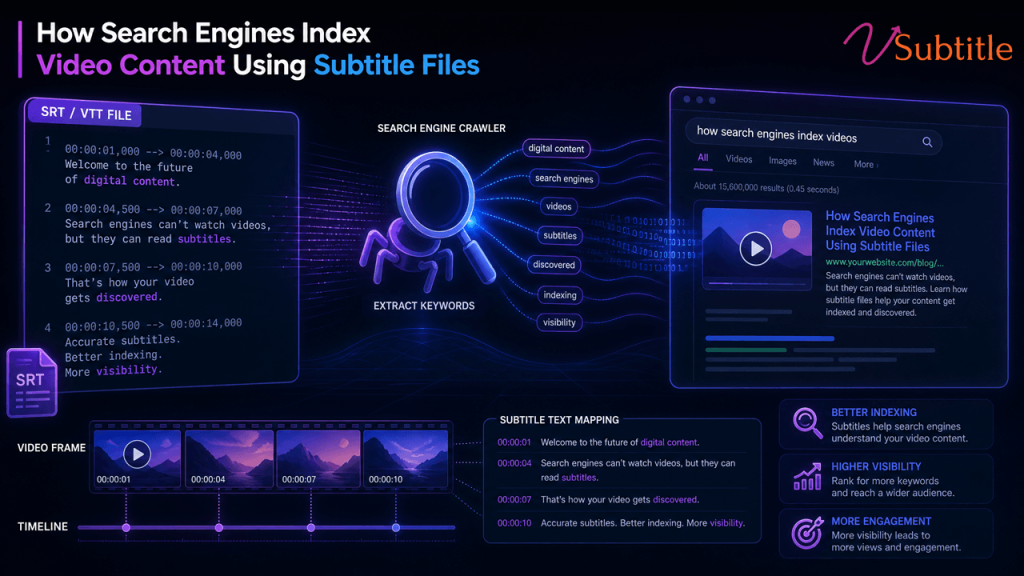
Video now accounts for the majority of consumer internet traffic, yet search engines still can’t literally “watch” a video the way a person does. What they can read is text — and subtitle files are one of the most reliable ways to hand them that text in a structured, machine-readable format. In this guide, we’ll break down exactly how search engines use subtitle files (like SRT and VTT) to understand, rank, and surface video content, and how you can use this to your advantage. Why Search Engines Can’t “Watch” Video the Way Humans Do Google, Bing, and other search engines rely on crawlers that parse text, markup, and metadata. A crawler can’t sit through a 20-minute tutorial and understand the nuance of what’s being said — it needs a text layer to work from. Without that layer, a video is essentially a black box: the crawler can see a file exists, note its duration and thumbnail, but has almost no idea what the content actually covers. This is where subtitle files step in. A well-formatted subtitle file gives search engines a timestamped transcript of everything spoken (and often described) in the video, turning an opaque media file into readable, indexable content. The Role of Subtitle Files in Video Indexing Subtitle files typically come in a few standard formats — SRT (SubRip), VTT (WebVTT), and occasionally SBV or SSA. Each contains three core pieces of information for every line of dialogue: a sequence number, a start and end timestamp, and the text itself. That structure matters because it gives search engines two things at once: the raw keywords spoken in the video, and the exact moment those words occur. Platforms like YouTube already index subtitle text directly, which is why accurately captioned videos tend to rank for a wider range of long-tail queries than uncaptioned ones. The same principle extends to videos embedded on your own website when subtitle files are properly linked and structured. How Search Engines Extract and Use Subtitle Data 1. Crawling the Subtitle File When a subtitle file (SRT/VTT) is publicly accessible — either embedded in the video player, linked via a <track> element, or referenced in structured data — search engine crawlers can fetch and parse it just like any other text file on your site. 2. Associating Text With the Video Object Search engines then map the extracted text back to the specific video, typically via schema.org VideoObject markup, the transcript field, or the caption property. This tells the crawler, “this block of text belongs to this specific video, at these specific timestamps.” 3. Building a Searchable Index Once associated, the subtitle text is treated similarly to on-page content: it’s tokenized, weighted for relevance, and used to match user queries. This is why a video with a clean, accurate transcript can surface for very specific, conversational search queries — because the words the viewer typed are literally present in the caption text. 4. Powering Rich Results Timestamped subtitle data also powers features like key moments, video snippets, and “jump to” links in search results — all of which increase click-through rate without any additional content creation. Subtitle Files vs. Closed Captions vs. Transcripts These three terms get used interchangeably, but they serve slightly different purposes from an SEO and indexing standpoint: For maximum indexing benefit, the strongest setup combines all three: a properly formatted subtitle file for the player, closed captions for accessibility compliance, and a full transcript published on the page for search engines to crawl without any extraction step at all. If you’re unsure which format fits your workflow, our SRT vs. VTT vs. ASS subtitle format guide breaks down the technical differences and when to use each one. Schema Markup and Technical SEO for Video Subtitle files do most of the heavy lifting, but they work best alongside proper technical implementation. A few essentials: This is precisely the kind of workflow that tools like vSubtitle are built for — generating accurate, properly timed subtitle files in SRT and VTT formats so they’re ready to plug into your player, your schema markup, and your video sitemap without manual cleanup. Best Practices for Subtitle-Driven Video SEO A quick checklist to make sure your subtitle files are actually helping search engines index your video content, not just sitting unused: If you’re producing videos at scale, doing this manually becomes a bottleneck fast. Our breakdown of AI subtitles vs. YouTube’s auto captions can help you decide when auto-generated captions are enough and when they need a human pass. Common Mistakes That Hurt Video Indexing How vSubtitle Helps You Get This Right Whether you’re publishing tutorials, product demos, or long-form YouTube content, vSubtitle generates accurate, properly timestamped subtitle files that are ready for both viewers and search engine crawlers. Because the output is clean SRT/VTT text rather than baked-in captions, it slots directly into schema markup, HTML5 track elements, and video sitemaps — the exact technical setup covered above. For creators publishing to YouTube specifically, our piece on how multilingual captions double YouTube watch time shows how translated subtitle files extend both watch time and international reach. Subtitles don’t just help crawlers — they help real readers stay on the page longer, too. Our post on how subtitles increase time on page for SEO digs into that engagement side of the equation. If compliance is also a priority — for accessibility laws like ADA or WCAG — our guide to video accessibility walks through the standards you need to meet alongside your SEO goals. And for a deeper look at the data behind captions and rankings, see our detailed breakdown of how AI-generated subtitles improve video SEO, including experiments, metrics, and an implementation checklist. You can browse more guides like this one on the vSubtitle blog, or head straight to the auto subtitle generator to start generating accurate subtitles for your own videos today. Frequently Asked Questions (FAQs) Conclusion Search engines depend on text to understand video, and subtitle files are the cleanest, most direct way
Subtitling for VR and AR: How to Place Captions in a 360-Degree Space
Advanced Captioning & Emerging Tech, AI Subtitling & Captioning

Subtitling for VR and AR: How to Place Captions in a 360-Degree Space (2026)

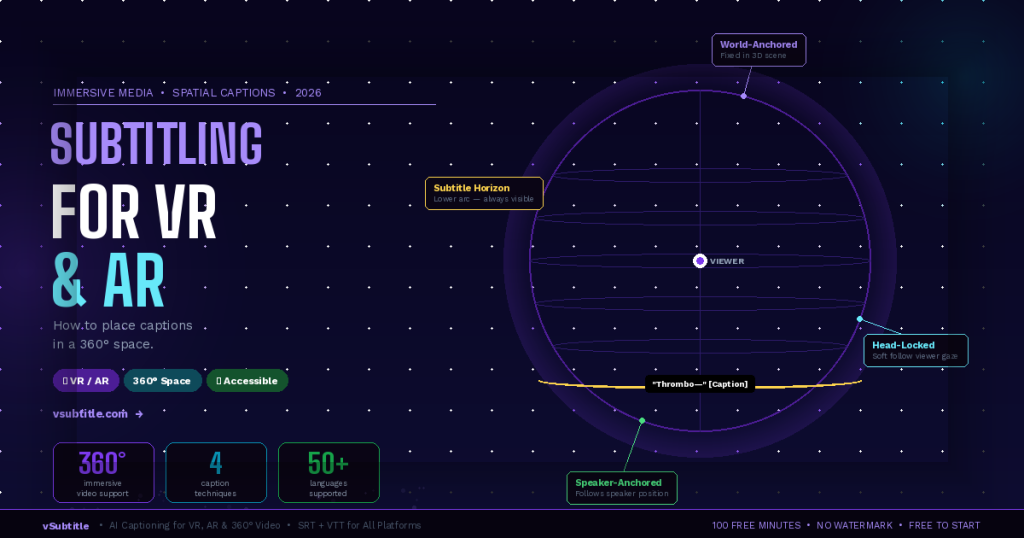
Every traditional rule for subtitling assumes a flat, fixed screen. The caption sits at the bottom third. The viewer looks forward. The text is always visible. VR and AR break every one of these assumptions. In a 360-degree immersive environment, there is no ‘bottom third’. The viewer can look in any direction — up, down, behind them. The speaker might be to the left while the viewer is looking right. A caption anchored to one position in the virtual world could be completely invisible if the viewer isn’t looking that way. And if captions follow the viewer’s gaze too aggressively, they become nauseating. Subtitling for immersive media is one of the most technically and creatively challenging problems in accessible content production — and in 2026, it’s no longer a niche concern. VR training programmes, AR surgical overlays, immersive journalism, 360-degree tourism content, virtual classrooms, and XR gaming are all producing video content that needs to be accessible to deaf and hard-of-hearing audiences. This guide explains the unique challenges of captioning in 360-degree space, the main techniques being used, the tools available, and a practical workflow for any creator working with immersive content — including how vSubtitle fits into the pipeline. 🥽  This is a forward-looking guide for an emerging field. Best practices are still evolving — but the core accessibility principles remain constant. The goal is always the same: ensure every viewer can fully access the content, regardless of how they experience it. 1. Why Standard Subtitling Approaches Fail in VR and AR Before exploring solutions, it’s worth understanding exactly why traditional captioning approaches break down in immersive environments. The challenges are distinct from anything flat-screen video creators encounter. The Viewport Problem In standard video, the viewport is fixed — the viewer always sees the same rectangular frame. A caption placed at the bottom centre is always in the viewer’s field of view. In VR, the viewer’s field of view is a small window into a full 360-degree sphere. A caption rendered at a fixed position in the 3D world might be directly behind the viewer — completely invisible — while dialogue is playing. The Speaker Location Problem In flat video, the speaker is almost always on screen when they’re speaking. In 360-degree video or VR, a speaker may be positioned anywhere in the environment — to the left, behind the viewer, above them. If the viewer is looking in a different direction, they miss both the speaker’s visual presence and any caption positioned near the speaker. The Motion Sickness Problem Captions that are ‘head-locked’ — fixed to the viewer’s field of view and moving with every head rotation — create a disturbing visual effect similar to text on a windshield. They feel unnatural, reduce immersion, and for many users cause disorientation or nausea, particularly in fully enclosed VR headsets. The solution is not simple: captions need to be accessible without being rigidly attached to the viewer’s gaze. The Depth and Scale Problem In a 3D immersive environment, captions rendered at the wrong depth or scale can appear to float uncomfortably close to the viewer’s face, or so far away that they’re illegible. Text that looks perfect at 2 metres in a virtual environment may be unreadable at 10 metres, or uncomfortably large at 0.5 metres. Finding the right rendering depth for readable, comfortable captions requires testing across headset types. The Immersion Disruption Problem VR and AR are defined by presence — the feeling of actually being in the environment. Heavy or intrusive captioning can break this presence, reminding viewers that they’re watching content rather than experiencing it. The challenge is making captions accessible without making them a distraction from the immersive experience itself. 🔬  These challenges don’t mean 360-degree content can’t be subtitled — they mean it requires different approaches than flat-screen content. Researchers, broadcasters, and immersive content studios have developed several working solutions, each with specific tradeoffs. 2. The 4 Main Captioning Approaches for 360-Degree and VR Content Technique 1:  World-Anchored (Diegetic) CaptionsCaptions are placed at a fixed position in the 3D world — attached to the environment rather than the viewer. Like a sign floating in the virtual space, they stay in one place while the viewer moves. Often positioned in the viewer’s natural line of sight or near where the speaker is located in the scene.✅ Best for: Narrative VR experiences, 360-degree documentaries, and content where the director controls the viewer’s attention. Creates the most natural, immersive feel when executed well.⚠️ Watch out: Captions can become invisible if the viewer looks away. Requires careful scene design to ensure captions are positioned where the viewer naturally looks. Not suitable for action-heavy content where the viewer may be looking in any direction. Technique 2:  Head-Locked with Soft Follow (Semi-Fixed)Captions follow the viewer’s gaze but with a slight lag — positioned slightly below the centre of the viewer’s field of view and ‘floating’ into position smoothly rather than snapping to the viewer’s exact orientation. This creates a more comfortable experience than rigid head-locking while ensuring captions are always visible.✅ Best for: Interactive VR experiences, VR training, and content where the viewer has significant freedom of movement. Balances accessibility and comfort better than fully head-locked captions.⚠️ Watch out: Must be implemented with carefully tuned lag parameters to avoid the ‘swimming’ sensation. Pure head-locking without lag is discouraged. Positioning requires testing across headset types. Technique 3:  Speaker-Anchored (Proximity-Based) CaptionsCaptions are attached to or positioned near the speaker in the virtual environment, following the speaker if they move. An audio-direction indicator (arrow or glow effect) optionally guides the viewer toward the active speaker when they’re not looking in that direction.✅ Best for: Multi-speaker VR dialogues, 360-degree interview formats, theatrical VR, and content where identifying who is speaking is critical to the narrative.⚠️ Watch out: Requires spatial audio integration and often speaker tracking in the content. Complex to implement for pre-recorded 360-degree video without real-time rendering. Audio-direction indicators must not disrupt immersion. Technique 4:  Subtitle Horizon (Persistent Lower Arc)Captions are rendered in

AI Subtitles vs YouTube Auto Captions
AI Subtitling & Captioning

AI Subtitles vs YouTube Auto Captions: Is It Worth Upgrading in 2026?

YouTube’s automatic captions are convenient. They’re free, built-in, and require no setup. But in 2026, many creators are asking: Are YouTube auto captions accurate enough — or is it worth upgrading to AI subtitle software? If you care about watch time, SEO, accessibility, and global reach, this comparison will help you decide. How YouTube Auto Captions Work YouTube auto captions rely on built-in speech recognition to automatically generate subtitles after your video is uploaded. Pros: Limitations: For casual creators, this may be enough. For growing channels, the limitations become noticeable. What AI Subtitle Software Does Differently AI subtitle tools like vSubtitle are built specifically for professional subtitling — not just basic speech-to-text. Modern AI subtitle software offers: Instead of relying on YouTube’s internal processing, you control the quality before publishing. 📊 Performance Comparison: AI Subtitles vs YouTube Auto Captions Feature YouTube Auto Captions AI Subtitles (e.g., vSubtitle) Cost Free Paid (affordable plans) Accuracy (Clear Audio) ⭐⭐⭐ ⭐⭐⭐⭐⭐ Accent Handling ⭐⭐ ⭐⭐⭐⭐ Technical Terms ⭐⭐ ⭐⭐⭐⭐ Subtitle Timing Control Limited Advanced timeline editing Multilingual Support Basic auto-translate Dedicated multilingual support SEO Optimization Basic indexing Optimized subtitle files Bulk Workflow Manual per video Batch processing Editing Experience Basic Professional-level control Scalability Limited High Accuracy: The Biggest Difference YouTube auto captions often: AI subtitle tools trained for professional workflows perform better, especially when: For creators who care about professionalism, this difference matters. SEO & Watch Time Impact Subtitles influence: While YouTube auto captions help with indexing, properly structured subtitle files (SRT/VTT) can improve clarity and international reach. If you’re targeting global audiences, multilingual AI subtitles are far more effective than relying on auto-translate. Editing Workflow: Time Is Money Editing YouTube auto captions directly in Studio can be slow, especially for longer videos. AI subtitle platforms allow: For creators uploading consistently, workflow efficiency becomes critical. When YouTube Auto Captions Are Enough Stick with YouTube auto captions if: They’re free and convenient. When It’s Worth Upgrading to AI Subtitles Upgrade if: In these cases, the upgrade pays off quickly. Why Many Creators Switch to AI Subtitle Tools Creators upgrading from YouTube auto captions often report: Platforms like vSubtitle are designed for creators who are scaling — not just experimenting. Final Verdict: Is It Worth Upgrading in 2026? If you’re serious about growing your YouTube channel, relying solely on auto captions may limit your potential. YouTube auto captions are convenient.AI subtitles are strategic. For creators aiming for long-term growth, better engagement, and international expansion, upgrading to dedicated AI subtitle software is often worth it. FAQs – AI Subtitles vs YouTube Auto Captions

AI SEO for Video SEO
AI Subtitling & Captioning, AI Video Tools

How AI-generated subtitles improve video SEO: experiments, metrics, and implementation checklist.

AI subtitles are now a decisive edge for video SEO, lifting discoverability, watch time, and global reach while meeting accessibility and compliance standards across industries and regions. This guide distills experiments, metrics, and an implementation checklist to help OTT, e-learning, SaaS marketing, agencies, gaming, enterprise training, higher education, and NGOs turn captions into measurable growth levers. Why AI subtitles matter for SEO Evidence and stats: engagement lifts How AI-generated subtitles improve video SEO Experiments to run Design small, controlled tests by audience and platform to validate gains from AI subtitles across priority markets. Experiment 1: Watch time uplift on YouTube Experiment 2: International SEO via multilingual captions Experiment 3: Social video engagement with caption styling Metrics that matter Tie subtitle work to metrics that correlate with visibility, conversion, and compliance. Subtitle formats: SRT vs VTT for SEO-friendly subtitles Closed caption compliance essentials Implementation checklist Use this step-by-step to operationalize AI subtitles at scale and align with video SEO captions goals. Real-world scenarios H2 Expert guidance and trends Conclusion and next steps AI subtitles are a force multiplier for discoverability, engagement, and global growth when paired with rigorous QA, compliance, and SEO integration across transcripts and schema. For organizations across OTT, e-learning, SaaS, agencies, gaming, enterprise training, higher education, and NGOs, now is the time to operationalize captioning workflows and run experiments that prove ROI on watch time, impressions, and international sessions. For expert help with dubbing, voice-over, subtitling, and audio description—including ADA/WCAG-aligned workflows and multilingual SEO strategy—contact the team to launch a scalable program tailored to target markets in North America, Europe, India, and MENA. FAQs – AI Subtitles for Video SEO

Top 10 AI Subtitling Tools
AI Subtitling & Captioning, AI Video Tools

Top 10 AI Subtitling Tools in 2026: Features, Accuracy & Comparison

Introduction AI subtitling tools have become essential in 2026. From YouTube creators and media teams to enterprises and global brands, subtitles are no longer optional — they are critical for accessibility, engagement, reach, and SEO. But with dozens of AI subtitling tools on the market, choosing the right one can be confusing. Some prioritize speed, others focus on multilingual support, and a few are built to scale across teams and workflows. This guide compares the top 10 AI subtitling tools in 2026, evaluating them on accuracy, features, scalability, and real-world use cases — so you can choose the tool that fits your needs. How We Evaluated These AI Subtitling Tools To keep this comparison fair and practical, each tool was evaluated based on: No tool is “perfect” for everyone — but some perform better across more scenarios. 🏆 Top 10 AI Subtitling Tools in 2026 1. vSubtitle — Best Overall AI Subtitling Tool vSubtitle stands out as the most balanced AI subtitling solution in 2026, combining accuracy, speed, and scalability without locking users into complex workflows. Strengths Best for: Creators, agencies, enterprises, and global teams looking for one tool that works across multiple use cases. 2. Rev AI Known for strong speech recognition, Rev AI is widely used in professional environments. Pros Cons Best for: Developers and enterprise integrations. 3. Descript A popular choice for creators who want transcription and video editing together. Pros Cons Best for: Solo creators and podcasters. 4. VEED VEED focuses on fast social media subtitle workflows. Pros Cons Best for: Social media creators. 5. Kapwing Kapwing offers a simple subtitle experience inside a broader video editor. Pros Cons Best for: Casual creators and small teams. 6. Sonix Sonix is known for transcription accuracy and language coverage. Pros Cons Best for: Transcription-heavy teams. 7. Happy Scribe Popular in media and education sectors. Pros Cons Best for: Media and academic users. 8. Subtitle Edit Online A lightweight solution for subtitle creation. Pros Cons Best for: Users with existing subtitle experience. 9. Amberscript Used in corporate and compliance environments. Pros Cons Best for: Regulated industries. 10. Zubtitle Designed for quick social video captions. Pros Cons Best for: Short social clips. 📊 AI Subtitling Tools Comparison Table (2026) Tool Accuracy Multilingual Support Editing Control Scalability Best Use Case vSubtitle ⭐⭐⭐⭐⭐ ⭐⭐⭐⭐⭐ ⭐⭐⭐⭐⭐ ⭐⭐⭐⭐⭐ Best overall Rev AI ⭐⭐⭐⭐⭐ ⭐⭐⭐⭐ ⭐⭐⭐ ⭐⭐⭐⭐ Enterprise & API Descript ⭐⭐⭐⭐ ⭐⭐⭐ ⭐⭐⭐⭐ ⭐⭐ Creators VEED ⭐⭐⭐ ⭐⭐⭐ ⭐⭐ ⭐⭐ Social media Kapwing ⭐⭐⭐ ⭐⭐ ⭐⭐ ⭐⭐ Beginners Sonix ⭐⭐⭐⭐ ⭐⭐⭐⭐ ⭐⭐⭐ ⭐⭐⭐ Transcription Happy Scribe ⭐⭐⭐⭐ ⭐⭐⭐⭐ ⭐⭐⭐ ⭐⭐⭐ Media & education Subtitle Edit ⭐⭐ ⭐⭐ ⭐⭐⭐ ⭐ Manual users Amberscript ⭐⭐⭐⭐ ⭐⭐⭐ ⭐⭐ ⭐⭐⭐ Corporate Zubtitle ⭐⭐ ⭐ ⭐ ⭐ Short clips Why vSubtitle Ranks as “Best Overall” (Without the Hype) vSubtitle isn’t the most niche or the most specialized — and that’s exactly why it wins. It consistently performs well across: Instead of forcing users into a single workflow, vSubtitle adapts to different content types and business sizes, making it a reliable long-term choice rather than a short-term fix. How to Choose the Right AI Subtitling Tool Ask yourself: If you need one tool that grows with your needs, vSubtitle is a strong starting point. Final Verdict AI subtitling tools in 2026 vary widely in focus — from quick social captions to enterprise-grade solutions. For users who want accuracy, flexibility, and scalability in one platform, vSubtitle offers the most well-rounded experience without unnecessary complexity. FAQs – Top 10 AI Subtitling Tools in 2026

ai-subtitles-trends-2026
AI Subtitling & Captioning, AI in Video Technology, Media & OTT Innovation, Video Localization & Accessibility

The Future of AI Subtitles: Key Trends Shaping 2026 and Beyond

Video is no longer just visual storytelling—it’s a global, multilingual, and accessibility-first medium. As content consumption explodes across OTT platforms, social media, e-learning, and enterprise communication, subtitles and captions have become mission-critical. In 2026 and beyond, the future of AI subtitles is about far more than converting speech to text. It’s about intelligence, context, personalization, and seamless global reach. In this blog, we explore how AI-powered subtitles are evolving, the key AI captioning trends of 2026, and what next-generation subtitle technology means for creators, businesses, and platforms worldwide. Why AI Subtitles Matter More Than Ever Over 80% of online videos are watched without sound, and global audiences increasingly prefer content in their native language. This has pushed subtitles from a “nice-to-have” feature to a core video strategy. Modern automatic subtitling technology enables: As AI subtitle automation matures, it’s reshaping how videos are produced, distributed, and consumed. Key AI Subtitle Trends Shaping 2026 and Beyond 1. Real-Time On-Device AI Captioning One of the biggest AI subtitle trends for video content is the shift toward real-time on-device AI captioning. Instead of relying solely on cloud processing, next-generation subtitle technology increasingly works directly on devices—smartphones, cameras, conferencing tools, and even smart TVs. Why this matters: This trend is redefining real-time AI captioning for both live and recorded content. 2. Sentiment-Aware and Context-Aware AI Subtitles Traditional subtitles focus on what is being said. The future of AI subtitles and captions focuses on how it’s being said. Sentiment-aware AI subtitles analyze: For example: This move toward context-aware subtitles dramatically improves viewer comprehension and engagement—especially for films, series, and branded storytelling. 3. Personalized Subtitle Tracks Using AI Personalization is no longer limited to content recommendations. In 2026, personalized subtitle tracks using AI are becoming a major differentiator. Viewers can increasingly: This is especially valuable for: AI-powered subtitles now adapt to the viewer—not the other way around. 4. Interactive Transcripts for Videos Another powerful evolution is the rise of interactive transcripts for videos. Instead of static text files, AI-generated transcripts now: From a business perspective, interactive transcripts: This trend tightly connects AI transcription, subtitles, and discoverability into a single intelligent workflow. 5. Multilingual AI Subtitles with Contextual Understanding Global reach demands more than literal translation. Multilingual AI subtitles in 2026 leverage advanced language models trained on cultural and contextual data. Modern video localization AI focuses on: This results in subtitles that feel native, not translated—critical for international audiences and OTT platforms. 6. Adaptive Subtitle Styling with AI Visual consistency is becoming just as important as textual accuracy. Adaptive subtitle styling with AI automatically adjusts subtitles based on: This ensures: It’s a subtle but impactful leap in AI subtitle technology in 2026 and beyond. How AI Subtitles Are Transforming Video Workflows The shift toward AI subtitle automation is streamlining workflows across industries: By integrating AI captioning software directly into production pipelines, teams save time, reduce costs, and improve consistency. AI vs Human Subtitles: The 2026 Reality In 2026, the question is no longer AI vs human—it’s how they work together. AI excels at: Human expertise adds value through: The most effective subtitle workflows combine AI-powered subtitles with optional human review—especially for premium or high-stakes content. What’s Next for AI Subtitles Beyond 2026? Looking ahead, the next big trends in AI captioning may include: As video becomes more immersive and interactive, subtitles will evolve from passive text to intelligent communication layers. Final Thoughts: The Future Is Intelligent, Inclusive, and Global The future of AI subtitles is not just about automation—it’s about accessibility, personalization, and global connection. As AI subtitle trends for 2026 continue to evolve, businesses and creators who adopt smarter subtitle solutions will: Platforms like vSubtitle are at the forefront of this transformation—helping teams deliver accurate, scalable, and future-ready subtitle experiences. FAQs: The Future of AI Subtitles

Top 10 AI Captioning Tools 2026
AI Subtitling & Captioning, AI Video Tools, Video Localization & Accessibility

Top 10 AI Captioning Tools (Guide 2026)

Video content is everywhere—from YouTube and social media to OTT platforms, webinars, online courses, and enterprise communications. But in 2026, video without captions is invisible to a large part of the audience. That’s why AI captioning tools have become essential. They help creators, businesses, and platforms generate accurate captions and subtitles quickly, improve accessibility, boost engagement, and enhance video SEO. In this guide, we break down the top 10 AI captioning tools in 2026, compare features, and help you choose the best solution for your workflow. What Are AI Captioning Tools? AI captioning tools use speech-to-text and natural language processing to automatically generate captions and subtitles for video and audio content. Modern AI-powered captioning tools can: Compared to manual captioning, automatic captioning tools are faster, scalable, and cost-effective—especially for high-volume content. How We Evaluated the Best AI Captioning Tools To compile this list of the best AI captioning tools in 2026, we evaluated platforms based on: Top 10 AI Captioning Tools in 2026 1. vSubtitle Best for scalable, multilingual AI captioning vSubtitle is an advanced AI subtitle and captioning platform designed for businesses, creators, and media teams that need speed, accuracy, and multilingual reach. Key features: Best for:  Content creators, OTT platforms, enterprises, and localization teams 2. Rev AI Best for hybrid AI + human captioning Rev AI offers automatic captioning with the option to upgrade to human-reviewed captions. Key features: Best for:  Businesses needing compliance-ready captions 3. Otter.ai Best for meetings and live captions Otter.ai is popular for real-time AI captioning during meetings and virtual events. Key features: Best for: Meetings, webinars, and internal communication 4. Sonix Best for fast turnaround transcription and captions Sonix combines transcription and captioning with a clean UI. Key features: Best for: Podcasters, marketers, and video editors 5. Descript Best for creators who edit via text Descript is a unique AI transcription and captioning tool that lets users edit videos by editing text. Key features: Best for: YouTubers and content creators 6. VEED.io Best for social media captions VEED.io offers browser-based video editing with built-in AI captioning software. Key features: Best for: Social media teams and short-form creators 7. Kapwing Best for quick online captioning Kapwing is an easy-to-use tool for generating captions without technical complexity. Key features: Best for: Small teams and quick-turnaround projects 8. Happy Scribe Best for language coverage Happy Scribe supports a wide range of languages and accents. Key features: Best for: International teams and localization workflows 9. Trint Best for journalism and media teams Trint focuses on transcription-first workflows with strong captioning support. Key features: Best for: Media, newsrooms, and broadcasters 10. Speechmatics Best for API-based captioning Speechmatics is a speech recognition engine used by developers and enterprises. Key features: Best for: Developers and enterprise applications AI Captioning Tools Comparison (Quick Overview) Tool Best For Key Strength vSubtitle Scalable multilingual captioning Accuracy + localization Rev AI Compliance & accuracy AI + human review Otter.ai Live captions Real-time transcription Sonix Fast turnaround Speed & usability Descript Creators Text-based editing VEED.io Social media Caption styling Kapwing Beginners Simplicity Happy Scribe Global teams Language support Trint Media Collaboration Speechmatics Developers API & accuracy How to Choose the Right AI Captioning Tool When selecting an AI captioning tool, ask yourself: For high-volume, multilingual, and professional video workflows, AI-powered captioning tools like vSubtitle are designed to scale efficiently. Benefits of Using AI Captioning Tools in 2026 Using modern AI captioning tools helps you: As video consumption grows, captions are no longer optional—they’re essential. Final Thoughts The demand for accurate, scalable, and fast captioning continues to grow. The best AI captioning tools in 2026 combine automation, intelligence, and flexibility to support modern video workflows.Whether you’re a creator, business, or media platform, choosing the right AI captioning software can dramatically improve reach, accessibility, and efficiency. FAQs – TOP 10 AI Captioning Tools

Scroll to Top