

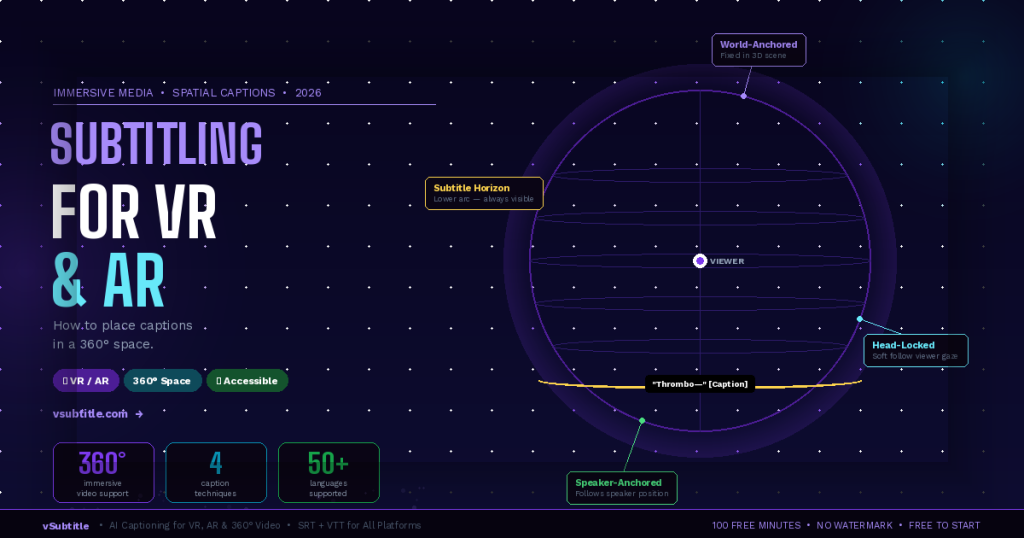
Subtitling for VR and AR: How to Place Captions in a 360-Degree Space (2026)
Every traditional rule for subtitling assumes a flat, fixed screen. The caption sits at the bottom third. The viewer looks forward. The text is always visible. VR and AR break every one of these assumptions. In a 360-degree immersive environment, there is no ‘bottom third’. The viewer can look in any direction — up, down, behind them. The speaker might be to the left while the viewer is looking right. A caption anchored to one position in the virtual world could be completely invisible if the viewer isn’t looking that way. And if captions follow the viewer’s gaze too aggressively, they become nauseating. Subtitling for immersive media is one of the most technically and creatively challenging problems in accessible content production — and in 2026, it’s no longer a niche concern. VR training programmes, AR surgical overlays, immersive journalism, 360-degree tourism content, virtual classrooms, and XR gaming are all producing video content that needs to be accessible to deaf and hard-of-hearing audiences. This guide explains the unique challenges of captioning in 360-degree space, the main techniques being used, the tools available, and a practical workflow for any creator working with immersive content — including how vSubtitle fits into the pipeline. 🥽 This is a forward-looking guide for an emerging field. Best practices are still evolving — but the core accessibility principles remain constant. The goal is always the same: ensure every viewer can fully access the content, regardless of how they experience it. 1. Why Standard Subtitling Approaches Fail in VR and AR Before exploring solutions, it’s worth understanding exactly why traditional captioning approaches break down in immersive environments. The challenges are distinct from anything flat-screen video creators encounter. The Viewport Problem In standard video, the viewport is fixed — the viewer always sees the same rectangular frame. A caption placed at the bottom centre is always in the viewer’s field of view. In VR, the viewer’s field of view is a small window into a full 360-degree sphere. A caption rendered at a fixed position in the 3D world might be directly behind the viewer — completely invisible — while dialogue is playing. The Speaker Location Problem In flat video, the speaker is almost always on screen when they’re speaking. In 360-degree video or VR, a speaker may be positioned anywhere in the environment — to the left, behind the viewer, above them. If the viewer is looking in a different direction, they miss both the speaker’s visual presence and any caption positioned near the speaker. The Motion Sickness Problem Captions that are ‘head-locked’ — fixed to the viewer’s field of view and moving with every head rotation — create a disturbing visual effect similar to text on a windshield. They feel unnatural, reduce immersion, and for many users cause disorientation or nausea, particularly in fully enclosed VR headsets. The solution is not simple: captions need to be accessible without being rigidly attached to the viewer’s gaze. The Depth and Scale Problem In a 3D immersive environment, captions rendered at the wrong depth or scale can appear to float uncomfortably close to the viewer’s face, or so far away that they’re illegible. Text that looks perfect at 2 metres in a virtual environment may be unreadable at 10 metres, or uncomfortably large at 0.5 metres. Finding the right rendering depth for readable, comfortable captions requires testing across headset types. The Immersion Disruption Problem VR and AR are defined by presence — the feeling of actually being in the environment. Heavy or intrusive captioning can break this presence, reminding viewers that they’re watching content rather than experiencing it. The challenge is making captions accessible without making them a distraction from the immersive experience itself. 🔬 These challenges don’t mean 360-degree content can’t be subtitled — they mean it requires different approaches than flat-screen content. Researchers, broadcasters, and immersive content studios have developed several working solutions, each with specific tradeoffs. 2. The 4 Main Captioning Approaches for 360-Degree and VR Content Technique 1: World-Anchored (Diegetic) CaptionsCaptions are placed at a fixed position in the 3D world — attached to the environment rather than the viewer. Like a sign floating in the virtual space, they stay in one place while the viewer moves. Often positioned in the viewer’s natural line of sight or near where the speaker is located in the scene.✅ Best for: Narrative VR experiences, 360-degree documentaries, and content where the director controls the viewer’s attention. Creates the most natural, immersive feel when executed well.⚠️ Watch out: Captions can become invisible if the viewer looks away. Requires careful scene design to ensure captions are positioned where the viewer naturally looks. Not suitable for action-heavy content where the viewer may be looking in any direction. Technique 2: Head-Locked with Soft Follow (Semi-Fixed)Captions follow the viewer’s gaze but with a slight lag — positioned slightly below the centre of the viewer’s field of view and ‘floating’ into position smoothly rather than snapping to the viewer’s exact orientation. This creates a more comfortable experience than rigid head-locking while ensuring captions are always visible.✅ Best for: Interactive VR experiences, VR training, and content where the viewer has significant freedom of movement. Balances accessibility and comfort better than fully head-locked captions.⚠️ Watch out: Must be implemented with carefully tuned lag parameters to avoid the ‘swimming’ sensation. Pure head-locking without lag is discouraged. Positioning requires testing across headset types. Technique 3: Speaker-Anchored (Proximity-Based) CaptionsCaptions are attached to or positioned near the speaker in the virtual environment, following the speaker if they move. An audio-direction indicator (arrow or glow effect) optionally guides the viewer toward the active speaker when they’re not looking in that direction.✅ Best for: Multi-speaker VR dialogues, 360-degree interview formats, theatrical VR, and content where identifying who is speaking is critical to the narrative.⚠️ Watch out: Requires spatial audio integration and often speaker tracking in the content. Complex to implement for pre-recorded 360-degree video without real-time rendering. Audio-direction indicators must not disrupt immersion. Technique 4: Subtitle Horizon (Persistent Lower Arc)Captions are rendered in