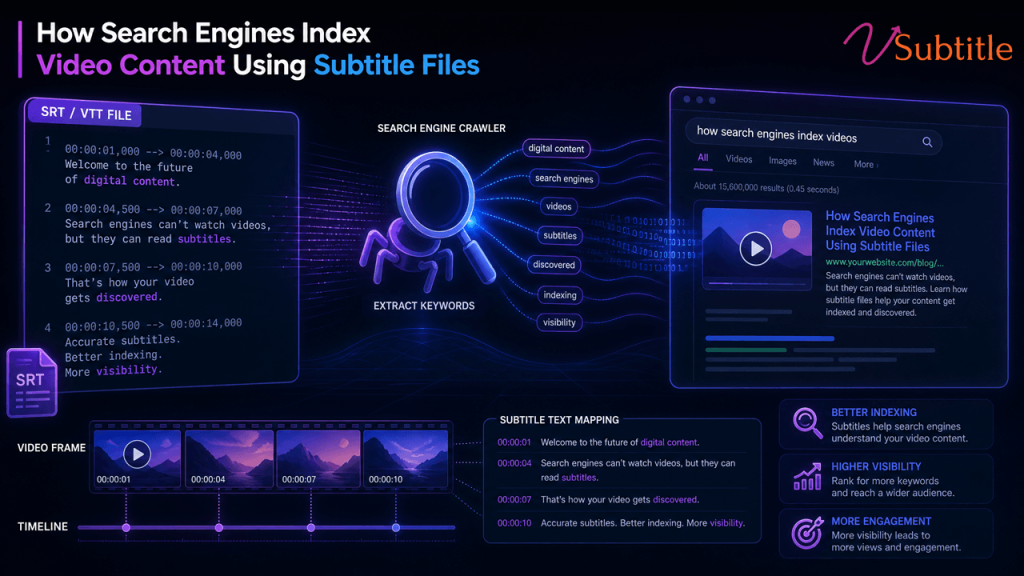
How Search Engines Index Video Content Using Subtitle Files
Video now accounts for the majority of consumer internet traffic, yet search engines still can’t literally “watch” a video the way a person does. What they can read is text — and subtitle files are one of the most reliable ways to hand them that text in a structured, machine-readable format. In this guide, we’ll break down exactly how search engines use subtitle files (like SRT and VTT) to understand, rank, and surface video content, and how you can use this to your advantage. Why Search Engines Can’t “Watch” Video the Way Humans Do Google, Bing, and other search engines rely on crawlers that parse text, markup, and metadata. A crawler can’t sit through a 20-minute tutorial and understand the nuance of what’s being said — it needs a text layer to work from. Without that layer, a video is essentially a black box: the crawler can see a file exists, note its duration and thumbnail, but has almost no idea what the content actually covers. This is where subtitle files step in. A well-formatted subtitle file gives search engines a timestamped transcript of everything spoken (and often described) in the video, turning an opaque media file into readable, indexable content. The Role of Subtitle Files in Video Indexing Subtitle files typically come in a few standard formats — SRT (SubRip), VTT (WebVTT), and occasionally SBV or SSA. Each contains three core pieces of information for every line of dialogue: a sequence number, a start and end timestamp, and the text itself. That structure matters because it gives search engines two things at once: the raw keywords spoken in the video, and the exact moment those words occur. Platforms like YouTube already index subtitle text directly, which is why accurately captioned videos tend to rank for a wider range of long-tail queries than uncaptioned ones. The same principle extends to videos embedded on your own website when subtitle files are properly linked and structured. How Search Engines Extract and Use Subtitle Data 1. Crawling the Subtitle File When a subtitle file (SRT/VTT) is publicly accessible — either embedded in the video player, linked via a <track> element, or referenced in structured data — search engine crawlers can fetch and parse it just like any other text file on your site. 2. Associating Text With the Video Object Search engines then map the extracted text back to the specific video, typically via schema.org VideoObject markup, the transcript field, or the caption property. This tells the crawler, “this block of text belongs to this specific video, at these specific timestamps.” 3. Building a Searchable Index Once associated, the subtitle text is treated similarly to on-page content: it’s tokenized, weighted for relevance, and used to match user queries. This is why a video with a clean, accurate transcript can surface for very specific, conversational search queries — because the words the viewer typed are literally present in the caption text. 4. Powering Rich Results Timestamped subtitle data also powers features like key moments, video snippets, and “jump to” links in search results — all of which increase click-through rate without any additional content creation. Subtitle Files vs. Closed Captions vs. Transcripts These three terms get used interchangeably, but they serve slightly different purposes from an SEO and indexing standpoint: For maximum indexing benefit, the strongest setup combines all three: a properly formatted subtitle file for the player, closed captions for accessibility compliance, and a full transcript published on the page for search engines to crawl without any extraction step at all. If you’re unsure which format fits your workflow, our SRT vs. VTT vs. ASS subtitle format guide breaks down the technical differences and when to use each one. Schema Markup and Technical SEO for Video Subtitle files do most of the heavy lifting, but they work best alongside proper technical implementation. A few essentials: This is precisely the kind of workflow that tools like vSubtitle are built for — generating accurate, properly timed subtitle files in SRT and VTT formats so they’re ready to plug into your player, your schema markup, and your video sitemap without manual cleanup. Best Practices for Subtitle-Driven Video SEO A quick checklist to make sure your subtitle files are actually helping search engines index your video content, not just sitting unused: If you’re producing videos at scale, doing this manually becomes a bottleneck fast. Our breakdown of AI subtitles vs. YouTube’s auto captions can help you decide when auto-generated captions are enough and when they need a human pass. Common Mistakes That Hurt Video Indexing How vSubtitle Helps You Get This Right Whether you’re publishing tutorials, product demos, or long-form YouTube content, vSubtitle generates accurate, properly timestamped subtitle files that are ready for both viewers and search engine crawlers. Because the output is clean SRT/VTT text rather than baked-in captions, it slots directly into schema markup, HTML5 track elements, and video sitemaps — the exact technical setup covered above. For creators publishing to YouTube specifically, our piece on how multilingual captions double YouTube watch time shows how translated subtitle files extend both watch time and international reach. Subtitles don’t just help crawlers — they help real readers stay on the page longer, too. Our post on how subtitles increase time on page for SEO digs into that engagement side of the equation. If compliance is also a priority — for accessibility laws like ADA or WCAG — our guide to video accessibility walks through the standards you need to meet alongside your SEO goals. And for a deeper look at the data behind captions and rankings, see our detailed breakdown of how AI-generated subtitles improve video SEO, including experiments, metrics, and an implementation checklist. You can browse more guides like this one on the vSubtitle blog, or head straight to the auto subtitle generator to start generating accurate subtitles for your own videos today. Frequently Asked Questions (FAQs) Conclusion Search engines depend on text to understand video, and subtitle files are the cleanest, most direct way