

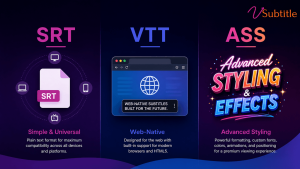
The Subtitle Dilemma: Why the Format Matters
You’ve finished your video, and now it’s time to add captions. But when you go to export, you’re met with a wall of acronyms: SRT, VTT, ASS, SSA, SBV…
Choosing the wrong format can lead to broken text, missing styles, or even videos that won’t upload to your favorite platforms. In this guide, we’ll break down the “Big Three” of subtitle formats—SRT, VTT, and ASS—so you can choose the right one for your workflow every time.
1. SRT (SubRip Text): The Universal Standard
Best For: Social Media (YouTube, Facebook, LinkedIn), basic video players, and maximum compatibility.
SRT is the “MP3 of subtitles.” It is the most widely supported format in the world. If you’re not sure what to use, SRT is almost always the safest bet.
- Pros: Extremely simple, human-readable, and supported by virtually every platform and video player.
- Cons: No support for advanced styling (colors, fonts, positioning). It’s strictly plain text.
- Structure:
1
00:00:01,000 –> 00:00:04,000
Hello, welcome to vSubtitle!
2. VTT (WebVTT): The Web-Native Powerhouse
Best For: HTML5 video players, websites, and platforms that require basic styling and metadata.
VTT was designed specifically for the web. It looks a lot like SRT but adds powerful features like text alignment, basic styling (bold/italic), and even metadata.
- Pros: Native support in modern browsers, allows for basic styling, and supports metadata for SEO.
- Cons: Not as universally supported by older desktop video players as SRT.
- Structure:
WEBVTT
00:00:01.000 –> 00:00:04.000
Hello, welcome to <v.bold>vSubtitle</v>!
3. ASS (Advanced Substation Alpha): The Stylist’s Choice
Best For: Anime, professional film production, and videos requiring complex typography, karaoke effects, or precise positioning.
Don’t let the name fool you—ASS is the most powerful format on this list. It allows for incredible control over how your subtitles look, including custom fonts, colors, shadows, and even animations.
- Pros: Total creative control. You can place text anywhere on the screen and use any font.
- Cons: High complexity and limited support on social media platforms. Most web players will ignore the styling and just show plain text.
- Structure:
[V4+ Styles]
Format: Name, Fontname, Fontsize, PrimaryColour…
Style: Default,Arial,20,&H00FFFFFF…
[Events]
Dialogue: 0,0:00:01.00,0:00:04.00,Default,,0,0,0,,Hello, welcome to vSubtitle!
Comparison Table: At a Glance
| Feature | SRT | VTT | ASS |
| Compatibility | Universal (High) | Web-Native (Medium) | Professional (Low) |
| Styling | None (Plain Text) | Basic (Bold/Italic) | Advanced (Fonts/Colors) |
| Positioning | Fixed (Bottom) | Basic (Top/Bottom) | Precise (Anywhere) |
| Best Use Case | Social Media | Websites/HTML5 | Anime/Pro Editing |
Which One Should You Choose?
- Use SRT if: You are uploading to YouTube, Facebook, or LinkedIn. It’s the standard for a reason.
- Use VTT if: You are embedding a video on your own website or using a modern web player like Video.js.
- Use ASS if: You are a professional editor or creator who needs subtitles to be a part of the visual design (e.g., “burnt-in” style looks without actually burning them in).
How vSubtitle Makes It Easy
No matter which format you need, vSubtitle has you covered. Our AI-powered platform allows you to:
- Auto-Generate: Create accurate captions in 100+ languages.
- Style: Use our customizable editor to perfect your look.
- Export: Download your subtitles in SRT, VTT, or JSON formats with a single click.
Try vSubtitle for Free and Export Your First Subtitle Today!

