

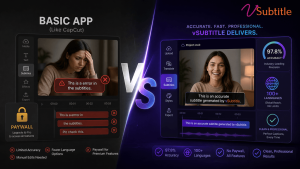
The CapCut Shift: Why Creators are Looking Elsewhere
For years, CapCut was the go-to for quick, free auto-captions. But as we move through 2026, the landscape has changed. CapCut has moved many of its best captioning features behind a “Pro” paywall, and for professional creators, the accuracy and styling limitations are becoming a bottleneck.
If you’re tired of fixing “buggy” transcriptions or want more control over your global reach, it’s time to look at professional alternatives. Here are the best CapCut alternatives for AI captions in 2026.
1. vSubtitle: The Professional’s Choice for Global Reach
Best For: High accuracy, multilingual support (100+ languages), and enterprise-level security.
While CapCut is great for quick social edits, vSubtitle is built for creators who need precision. With a 97.8% accuracy rate, it significantly reduces the time spent manually correcting text.
- Why it beats CapCut:
- Multilingual Mastery: Supports 100+ languages with cultural context awareness, whereas CapCut often struggles with non-English dialects.
- No Length Limits: Process hours of video in minutes, not just short clips.
- Professional Exports: Export in SRT, VTT, and JSON without watermarks or quality loss.
- The Verdict: If your goal is to scale your brand globally with perfect captions, vSubtitle is the clear winner.
2. Descript: The “Edit by Text” Powerhouse
Best For: Podcasters and creators who want to edit their video by editing the transcript.
Descript changed the game by allowing you to delete words from a transcript to automatically cut the video. Its AI captioning is robust and offers unique “Overdub” features.
- Pros: Incredible for long-form content and podcasts.
- Cons: A steep learning curve and a much higher price point than most creators need just for captions.
- The Verdict: Great for heavy editors, but overkill if you just need fast, accurate captions.
3. VEED.io: The Browser-Based All-in-One
Best For: Quick, stylish social media captions directly in your browser.
VEED is a strong competitor to CapCut’s web version. It offers a wide range of “trendy” caption styles that are popular on TikTok and Reels.
- Pros: Very easy to use; no software download required.
- Cons: The free version is heavily restricted with watermarks, and the auto-caption accuracy can be hit-or-miss with background noise.
- The Verdict: A solid choice for social media managers who need “vibey” captions quickly.
4. DaVinci Resolve (with AI Plugins): The Hollywood Standard
Best For: Professional filmmakers and high-end production houses.
If you’re already using DaVinci Resolve for color grading, their built-in AI transcription (and third-party plugins) offers the most control over subtitle placement and typography.
- Pros: Professional-grade control and zero subscription fees (for the Studio version).
- Cons: Requires a powerful PC and professional editing knowledge.
- The Verdict: The best “free” option if you already own the software, but not for the average content creator.
Comparison: CapCut vs. The Alternatives
Comparison: CapCut vs. The Alternatives
| Feature | CapCut | vSubtitle | Descript | VEED.io |
| Accuracy | ~85-90% | 97.8% | ~95% | ~92% |
| Languages | ~20 | 100+ | ~22 | ~50 |
| Ease of Use | High | High | Medium | High |
| Best For | Casual Reels | Global Brands | Podcasts | Social Media |
Why 2026 is the Year to Upgrade
In 2026, captions aren’t just for accessibility—they are for SEO and retention. Search engines and AI answer engines now “read” your captions to understand your video content. Using a tool like vSubtitle ensures that your metadata is accurate, helping you rank higher and reach more people.
Ready to Move Beyond CapCut?
Stop settling for “good enough” captions. Experience the precision and speed of a professional AI subtitling platform.
Start for Free on vSubtitle Today!
Frequently Asked Questions (FAQ)
1. Is CapCut auto-captioning still free in 2026?
While CapCut still offers a basic version of auto-captions, many of the advanced styling options, longer video support, and higher accuracy models have been moved to the CapCut Pro subscription. For professional use without limitations, many creators are switching to dedicated platforms like vSubtitle.
2. Which AI captioning tool is the most accurate?
In our 2026 testing, vSubtitle leads the industry with a 97.8% accuracy rate, especially for technical jargon and non-English languages. While CapCut is convenient, it often requires more manual editing to fix transcription errors.
3. Can I export subtitles from CapCut to use in other editors?
CapCut’s export options for subtitle files (like SRT or VTT) are often restricted in the free version. Professional alternatives like vSubtitle allow you to export in multiple formats (SRT, VTT, JSON) with a single click, making it easier to use your captions across different platforms.
4. Does vSubtitle support more languages than CapCut?
Yes. vSubtitle supports over 100+ languages and dialects with cultural context awareness. CapCut’s language support is more limited, focusing primarily on the most common global languages.
5. How do captions improve my video SEO?
Search engines and AI answer engines (like ChatGPT and Google AI Overviews) can “read” your subtitle files to understand the context of your video. Accurate captions from a professional tool ensure that your video is indexed correctly, leading to higher search rankings and better discoverability.

