A tutorial that explains your product perfectly still fails if the new user watching it works in an open office with the sound off.
Key Take aways
- 65% of users say video is their preferred way to learn a new product, and 74% have watched a video specifically to learn how to use a website or app.
- Self-service video content cuts support ticket volume by an estimated 20–40%, dropping the cost per resolved contact from roughly $13.50 (agent-assisted) to $1.84 (self-service) — close to a 7x saving.
- Structured onboarding that includes video is linked to a 50% increase in customer retention, and cutting time-to-value has been shown to meaningfully lift ARR growth in mid-market SaaS.
- Captions aren’t optional polish on tutorial content — most tutorial viewing happens muted, in an office, or re-watched asynchronously by someone following along step by step.
- Product UI changes constantly, which makes tutorial captions uniquely prone to going stale — a caption referencing a renamed button or removed menu item is actively misleading, not just outdated.
- Captioned tutorial transcripts double as searchable help-center content, letting users and search engines find the exact video that answers a specific question.
Video has quietly become the default way SaaS companies teach new users how to actually use their product. Wyzowl’s State of Video Marketing report and related 2026 research on SaaS onboarding both point the same direction: the large majority of people now say they’d rather watch a short video than read documentation, and companies leaning into video-based onboarding are seeing meaningfully better retention and faster time-to-value than text-first approaches.
None of that value is guaranteed just because a tutorial exists. A product walkthrough that only works with the sound on quietly loses a large share of its actual audience — muted in an office, re-watching a shared screen recording without headphones, or simply skimming rather than watching start to finish. Captions are what keep a SaaS tutorial doing its job across all of those situations, and this guide covers exactly how leading SaaS teams use them: what makes tutorial captioning different from captioning other video content, where it fits across the different video types a SaaS company produces, and a practical workflow for keeping captions accurate as the product itself keeps changing.
Why Video — and Captioned Video Specifically — Drives SaaS Onboarding
| Finding | Why It Matters |
|---|---|
| 65% of users prefer video when learning how to use new software | Tutorial video isn’t a supplementary format — for most users, it’s the preferred one |
| Self-service video cuts support ticket volume by 20–40%, at roughly 1/7th the cost of an agent-assisted contact | Every tutorial that successfully answers a question on its own is a support cost avoided, provided the viewer can actually follow it |
| Structured onboarding (commonly video-led) is linked to a 50% lift in customer retention | Most SaaS churn happens in the first 30 days — tutorials are directly tied to whether a new user sticks around past that window |
| 89% of customers say they prefer video content when learning about new software products | Confirms the preference isn’t a niche behavior — it’s close to a default expectation among SaaS buyers and users |
| Cutting time-to-value by 20% lifted ARR growth 18% in a mid-market SaaS study | Tutorials that get users to their first success faster have a measurable, not just anecdotal, revenue impact |
None of these figures are captions-specific on their own — they describe the value of tutorial video broadly. But that value only reaches the share of the audience who can actually follow the video, and sound-off, distracted, or re-watching viewing conditions are the norm rather than the exception for how SaaS tutorials actually get consumed in practice.
Why Tutorial Captions Are Different From Captioning Other Video
Tutorials Are Watched at Work, Often Muted
A new user evaluating or onboarding into a SaaS product is frequently doing so during work hours, in an office, or on a call where unmuting a tutorial isn’t practical. The same sound-off viewing habits that shape social video consumption apply directly here — a tutorial without captions is effectively unusable in a meaningful share of the situations it’s actually watched in.
Product-Specific Terminology Has to Be Exact
Generic auto-captioning struggles most with the exact category of language a SaaS tutorial is built around: feature names, button labels, menu paths, and product-specific terminology that doesn’t appear in a general-purpose speech model’s training data. A caption that reads “click Reports” when the actual button says “Analytics” doesn’t just look sloppy — it actively breaks the tutorial for anyone following along on their own screen in real time.
Tutorials Are Re-Watched and Referenced Asynchronously
Unlike a lot of marketing video, tutorial content is frequently paused, rewound, and revisited days or weeks later when a user needs a reminder on a specific step. Captions make that kind of non-linear, reference-style viewing dramatically easier — scanning text for the right moment is faster than scrubbing through video audio to find it.
Captions Double as Searchable Help-Center Content
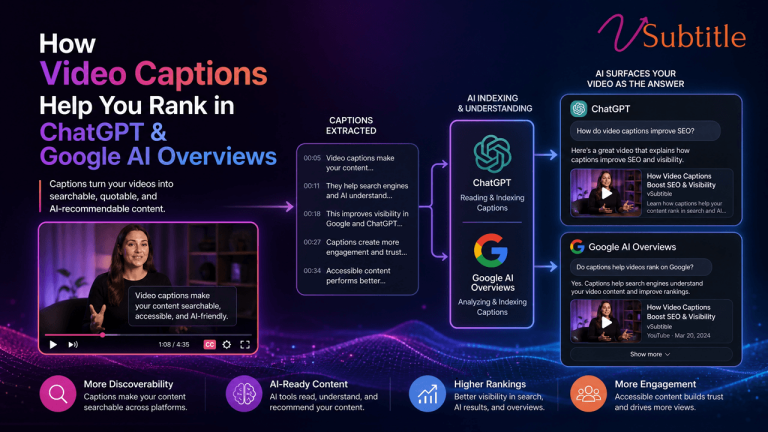
A tutorial’s transcript, published on the same page as the video, gives both the user and search engines text to search against — meaning a well-captioned tutorial can surface directly for the specific question it answers, rather than requiring a user to already know which video covers it. This is the same underlying mechanic covered in our guide to AI subtitles and video SEO, and it applies with particular force to help-center and tutorial content specifically, since users searching a knowledge base are often typing the exact phrase a good transcript would contain.
Global User Bases Need Translated Tutorials, Not Just Captioned Ones
SaaS products with international customers routinely serve users who aren’t fluent in the language a tutorial was recorded in. Translated captions extend the same tutorial’s usefulness across those markets without requiring a full re-record for each language.
Where Captions Fit Across SaaS Video Content Types
| Content Type | Why Captions Matter Here Specifically |
|---|---|
| Onboarding / welcome videos | First impression content, often watched immediately after signup in a work setting — muted viewing is especially likely here |
| Feature tutorials / walkthroughs | Dense with UI-specific terminology; users frequently follow along on their own screen in real time, needing exact wording |
| Help-center / knowledge-base videos | Doubles as searchable support content; captions and a published transcript directly improve findability |
| Release notes and feature-update videos | Short-lived relevance means captions need to be produced quickly and accurately without slowing the release cadence |
| Customer training / certification content | Often longer-form and higher-stakes; accuracy and completeness matter more than in short marketing clips |
| Internal enablement (sales, support, CS training) | Frequently overlooked for captioning entirely, despite the same muted-viewing and searchability benefits applying internally too |
The Problem Unique to SaaS: Captions Go Stale as Fast as the Product Changes
This is the challenge that separates SaaS tutorial captioning from almost every other video captioning use case. A product’s UI can change in a release cycle measured in weeks, not years — a button gets renamed, a menu gets restructured, a feature gets moved. A caption file that was perfectly accurate at recording time can become actively misleading within a single sprint, in a way that a captioned marketing video or a captioned interview simply doesn’t have to worry about.
Treating captioning as a one-time task at publish time, rather than an ongoing maintenance responsibility tied to the product’s own release cycle, is how tutorial libraries quietly accumulate outdated, confusing captions across dozens of videos — each one individually a small drift, collectively a real support burden.
A Practical Captioning Workflow for SaaS Tutorials
- Record with clear, deliberate narration of UI terminology, stating button and menu names exactly as they appear on screen — this reduces both transcription errors and the raw confusion a mismatched caption creates.
- Generate an initial caption draft automatically, then review it specifically for product terminology, feature names, and any recently renamed UI elements before publishing.
- Position captions clear of the UI being demonstrated. Tutorial video is uniquely prone to captions landing directly over the button or menu the narration is describing — check placement scene by scene, not just once.
- Publish a full transcript alongside the video in the help center or knowledge base, giving both users and search engines a searchable, text-based path to the exact tutorial that answers a given question.
- Tag captioned tutorials for review whenever the referenced feature ships a UI change, tying caption maintenance to the product’s own release notes rather than treating it as a separate, easy-to-forget task.
- Translate tutorials into the languages your active user base actually uses, prioritized by usage data rather than translating the entire library indiscriminately.
vSubtitle’s AI subtitle generator supports this workflow directly — producing accurate, editable captions with a fast review step built for exactly the kind of terminology correction SaaS tutorials need, and exporting to SRT, VTT, TXT, and DFXP so the same source file can serve the video player and a published help-center transcript. Translation into 100+ languages covers international user bases from the same source recording. For teams setting up this process for the first time, our beginner’s guide to AI subtitling and our SRT vs VTT vs ASS format guide are useful starting points.
Who Should Own Tutorial Captioning Inside a SaaS Company
Captioning tends to fall through organizational cracks specifically because tutorial video sits at the intersection of several teams — product marketing produces onboarding content, customer success or support owns the help center, and product management drives the UI changes that make captions go stale. Without a clear owner, each team assumes captioning is someone else’s responsibility, and the maintenance gap described above grows unchecked.
The teams handling this well tend to assign clear ownership at two points: whoever publishes a new tutorial is responsible for its initial caption accuracy, and whoever ships a UI change affecting an existing tutorial is responsible for flagging it for a caption review — ideally as a checklist item in the same release process that already tracks documentation updates, rather than a separate, easily forgotten step.
Measuring Whether Captioned Tutorials Are Actually Working
Most product analytics and help-center platforms expose enough data to test caption impact directly rather than assuming it based on industry figures alone:
- Track completion rate and average watch time on tutorial video before and after adding or improving captions, ideally isolating this from other simultaneous changes to the video itself.
- Watch deflection rate — the share of help-center visits that resolve without a support ticket being filed — for pages featuring a captioned tutorial versus text-only documentation covering the same topic.
- Monitor search traffic to tutorial pages specifically after publishing a transcript alongside the video, since this is where a caption investment often shows up first in analytics.
- Survey new users directly during onboarding about whether tutorial content answered their question, cross-referenced against which tutorials they actually watched versus skipped.
As with most video performance questions, isolating captions as the specific variable — rather than changing narration, length, and captions all at once — gives the clearest read on whether the caption investment itself is what’s moving the numbers.
Common Mistakes
- Publishing unreviewed auto-captions on tutorial content, where terminology errors don’t just look unprofessional — they actively break a user trying to follow along in real time.
- Treating captioning as a one-time task with no connection to the product’s own release cycle, letting captions quietly go stale as the UI changes.
- Captioning marketing and onboarding video consistently while skipping internal enablement content, despite the same searchability and muted-viewing benefits applying there too.
- Publishing captioned video with no accompanying transcript on the page, missing an easy, low-cost improvement to help-center search and discoverability.
- Using a single default caption position that ends up covering exactly the UI element the tutorial is trying to highlight.
- Skipping translation entirely for a genuinely international user base, despite translated captions being far cheaper than producing separate localized tutorial recordings.
Frequently Asked Questions (FAQs)
Do SaaS product tutorials really need captions if the narration is clear?
Yes. Tutorial video is frequently watched at work, muted, or re-watched asynchronously by someone following along on their own screen — situations where clear narration alone doesn’t reach the viewer. Captions make the tutorial usable across all of these conditions, not just when someone is watching attentively with sound on.
How much can captioned self-serve video actually reduce support tickets?
Estimates put the reduction at roughly 20–40% for self-service video content generally, with per-contact cost dropping from around $13.50 for agent-assisted support to about $1.84 for self-service — close to a 7x saving. Captions are part of what makes that self-service content actually usable for the full range of viewing conditions tutorials get watched in.
Why do SaaS tutorial captions need more review than other video captions?
Because they’re dense with product-specific terminology — feature names, button labels, and menu paths — that generic auto-captioning frequently gets wrong, and because a product’s UI can change fast enough that a caption accurate at recording time becomes misleading within weeks.
Should tutorial transcripts be published somewhere besides the caption file itself?
Yes, ideally. A full transcript published in the help center or knowledge base alongside the video gives both users and search engines a searchable, text-based path to the specific tutorial that answers a given question, extending the video’s usefulness beyond whoever happens to watch it start to finish.
How often should SaaS companies update their tutorial captions?
Whenever the referenced feature changes. The most reliable approach is tying caption review to the product’s own release cycle, so a UI change that renames a button or restructures a menu triggers a caption check for any tutorial referencing that feature, rather than relying on someone noticing the drift later.
Is it worth translating SaaS tutorial videos for international users?
For companies with a genuinely international user base, yes. Translated captions extend a tutorial’s usefulness to non-native-language users at a fraction of the cost of producing separate localized recordings, and can be prioritized by which languages your actual user data shows the most demand for.