

Most YouTube creators optimise endlessly — thumbnails, titles, SEO descriptions, upload schedules, hooks, chapter markers. And yet one of the single biggest levers for watch time growth is almost universally ignored: multilingual captions.
The data is clear. Creators who add captions in multiple languages consistently see significant gains in watch time, subscriber growth, and international reach — often without changing a single frame of their videos. In this post, we’ll walk through the evidence, explain exactly why multilingual captions work so powerfully on YouTube, and show you the fastest way to implement them using vSubtitle.
| 📊 This isn’t a theoretical argument. The relationship between multilingual captions and YouTube watch time is well-documented by YouTube’s own research and supported by data from thousands of creators. Let’s look at the numbers. |
1. The Data: What Multilingual Captions Actually Do to Watch Time
Let’s start with the headline numbers before we dig into the why.
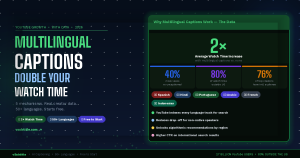
| 2×Average Watch Time Increase With Multilingual CaptionsCreators who add captions in the top languages of their audience regularly report watch time doubling — with some seeing 3–4× increases on individual videos. |
| 40%More views on captioned videos vs. uncaptioned | 80%Of YouTube watch time comes from outside the US | 76%Of top YouTube creators have non-English-speaking audiences |
YouTube’s own Creator Academy notes that videos with captions receive significantly more views and engagement than those without. But when you go beyond single-language captions and add subtitles in the languages your international audience actually speaks, the effect compounds dramatically.
Here’s why the numbers are so significant: YouTube is not primarily an English-language platform. Despite English being the most common language for content creation, the majority of YouTube’s 2.7 billion users do not speak English as their first language. Spanish, Hindi, Portuguese, Arabic, Indonesian, and French together account for hundreds of millions of active YouTube viewers — viewers who are actively searching for content in their own language, or content that has been made accessible to them.
| 🔑 Key insight: When you add multilingual captions, you’re not just helping existing viewers watch more of your video. You’re making your video discoverable to entire new audiences who would never have found it otherwise. |
2. Why Multilingual Captions Increase Watch Time: 5 Mechanisms
The watch time boost from multilingual captions isn’t a coincidence or a quirk of the algorithm. There are five distinct mechanisms driving it:
Mechanism 1: YouTube Indexes Caption Text for Search
When you upload a caption file (SRT or VTT) to a YouTube video, YouTube indexes every word in that file. This means your video can rank in search results for keywords that appear in your captions — even if those words never appear in your title, description, or tags.
Add multilingual captions and this effect multiplies across languages. A Spanish-language caption file means your video can surface in Spanish-language YouTube searches. A Hindi caption file means Hindi speakers searching for your topic can find your video. You effectively multiply the number of search queries your video is eligible to rank for — often by 5× to 10× depending on how many languages you add.
Mechanism 2: Reduced Drop-Off for Non-Native Speakers
Non-native English speakers watching English-language content often struggle to keep up with fast speech, accents, idioms, and colloquialisms. Without captions, many of these viewers drop off early — reducing your average view duration and signalling to YouTube’s algorithm that your content isn’t holding attention.
Add captions in their language and the drop-off disappears. Viewers who would previously leave at the 30-second mark now watch to completion. This directly increases your average view duration — one of YouTube’s strongest ranking signals — which in turn drives more impressions and more organic reach.
Mechanism 3: Algorithmic Recommendations Across Regions
YouTube’s recommendation algorithm factors in viewer location and language preference when deciding which videos to suggest. A video with English-only captions is primarily recommended to English-speaking regions. A video with Spanish, Hindi, and Portuguese captions alongside English becomes eligible for recommendation in Spain, Mexico, Brazil, India, and dozens of other markets.
This is how multilingual captions create compounding growth. Every new language you add opens up a new recommendation pool — and each recommendation that leads to a watched video sends positive engagement signals back to the algorithm.
Mechanism 4: Higher Click-Through Rates on International Searches
When a Spanish speaker searches YouTube and sees a video with a Spanish caption track available, they are significantly more likely to click on it than a video with no captions or English-only captions. The availability of native-language subtitles is a strong selection signal for international audiences, particularly in markets where English proficiency is lower.
Mechanism 5: Community Sharing and Cross-Language Virality
Content that is accessible in a viewer’s language is far more likely to be shared within their community. A viewer who watches your video with Spanish captions is more likely to share it with Spanish-speaking friends and family — creating a viral loop within that language community. Without multilingual captions, this organic sharing across language groups simply doesn’t happen.
| ⚡ All five of these mechanisms are cumulative. Adding multilingual captions doesn’t just improve one metric — it improves search ranking, watch time, recommendations, CTR, and shareability simultaneously. |
3. Which Languages Should You Add First?
You don’t need to caption your videos in 50 languages to see results. Adding even 2–3 high-priority languages can produce a significant and measurable impact. Here’s how to prioritise:
Step 1: Check Your YouTube Analytics
Go to YouTube Studio → Analytics → Audience → Geography. This shows you exactly where your existing viewers are coming from. If you already have significant viewership from Brazil, Spain, or India without multilingual captions, adding Portuguese, Spanish, or Hindi will have an immediate impact on those audiences.
Step 2: Target the Highest-Volume Non-English Languages
If you’re starting from scratch with no international audience data, prioritise the languages with the largest YouTube user bases after English:
| Language | YouTube User Base & Why It Matters |
| Spanish | 500M+ speakers globally. Largest non-English YouTube audience. Covers Spain, Mexico, Colombia, Argentina, and 18 other countries. |
| Hindi | 600M+ speakers. India is YouTube’s largest market by user count. Hindi content is massively underserved relative to demand. |
| Portuguese | Covers Brazil — YouTube’s 2nd largest market by watch time. Brazilian Portuguese speakers are highly active on YouTube. |
| Arabic | 400M+ speakers across 22 countries. Arab YouTube viewership is growing rapidly with a young, engaged demographic. |
| French | Covers France, Belgium, Canada, and 29 African nations. A single French caption track reaches 300M+ potential viewers. |
| Indonesian | Indonesia is one of YouTube’s top 5 markets by watch time. 270M people, very high mobile video consumption. |
| Japanese | High average watch time per user. Japanese audiences are loyal subscribers when content is accessible. |
| German | High-income market with strong engagement rates. German speakers are among the highest-value YouTube audiences for advertisers. |
| 🌍 Priority recommendation: If you create English-language content, start with Spanish, Hindi, and Portuguese. These three languages alone give you access to over 1.5 billion potential new viewers. |
4. How Multilingual Captions Supercharge YouTube SEO
Search is the second-largest driver of YouTube views after recommendations, and multilingual captions have a direct and measurable impact on search visibility. Here’s the mechanics:
YouTube Indexes Every Language Track Independently
When you upload a Spanish caption file to a video, YouTube doesn’t just note that a Spanish track exists — it indexes every word in that file and uses it to match the video against Spanish-language search queries. A video with five language caption tracks is effectively five times more indexed than a video with one.
Long-Tail Keywords Multiply Across Languages
The majority of YouTube search traffic comes from long-tail queries — specific, multi-word searches that reflect exactly what a viewer is looking for. If your video ranks for “how to edit videos on iPhone” in English, adding a Spanish caption track means it can also rank for the Spanish equivalent — and all its variations — without any additional keyword research or optimisation on your part.
Caption Files Outperform Auto-Generated Captions for SEO
YouTube’s auto-generated captions are indexable, but they contain errors — particularly for proper nouns, technical terms, and non-standard accents. Uploaded caption files that have been reviewed and corrected are indexed with higher confidence and are weighted more reliably by YouTube’s search system. Always upload your own caption files rather than relying on YouTube’s auto-captions for SEO purposes.
The Compound Effect Over Time
SEO gains from multilingual captions are not one-time. Every new video you publish with multilingual captions adds to your channel’s international footprint. Over 12–18 months, a creator consistently adding 3–5 language tracks to every video builds a substantial multilingual content library that compounds in search visibility over time.
| 📈 One creator case study: An English-language tech YouTube channel with 50K subscribers added Spanish and Portuguese captions to their back catalogue of 80 videos over a single weekend using vSubtitle. Within 90 days, their international watch time share had grown from 18% to 41% — more than doubling their global reach without publishing a single new video. |
5. How to Add Multilingual Captions to Your YouTube Videos (Using vSubtitle)
Understanding the value of multilingual captions is step one. Actually implementing them — without it taking 10 hours per video — is where most creators get stuck. This is where vSubtitle makes the biggest difference.
vSubtitle supports 50+ languages with AI-powered accuracy. It can generate captions in your video’s native language AND translate them into multiple other languages in the same workflow — all without leaving the browser.
| 🎁 vSubtitle gives you 100 free minutes of AI captioning with no watermark and no credit card required. That’s enough to add multilingual captions to your first 6–10 videos completely free. |
| 🚀 Step-by-Step: Adding Multilingual Captions |
Step 1: Upload Your Video to vSubtitle
Go to vsubtitle.com, create your free account, and upload your video file — or paste your YouTube URL directly. No file download needed if your video is already on YouTube.
Step 2: Generate Captions in Your Primary Language
Select the spoken language of your video and click Generate. vSubtitle’s AI will transcribe your video at 95%+ accuracy and sync each caption line to the correct timestamp. For a 10-minute video, this takes 3–5 minutes.
Step 3: Review and Correct the Primary Language Captions
Do a quick review pass in the built-in editor to catch any errors — particularly proper nouns, brand names, and technical terms. A corrected primary language transcript produces better translation quality in subsequent steps.
Step 4: Generate Translations
Use vSubtitle’s translation feature to generate caption files in your target languages. Select each language you want to add — for example Spanish, Hindi, and Portuguese — and vSubtitle generates translated, timestamped caption files for each. This takes seconds per language.
Step 5: Review Translations (Optional but Recommended)
AI translation quality is high for major languages, but if you have access to a native speaker for any of the target languages, a quick review of the translation adds extra polish and credibility. For most creators, the AI output is ready to publish without modification.
Step 6: Export Your Caption Files
Download an SRT file for each language. You’ll have one SRT per language — for example, video_es.srt (Spanish), video_hi.srt (Hindi), video_pt.srt (Portuguese).
Step 7: Upload Each Language Track to YouTube
In YouTube Studio, go to your video → Subtitles → Add Language. Select each language and upload the corresponding SRT file. YouTube will store and serve each language track independently — and index each one for search. Repeat for every language you want to add.
| ⏱️ Pro tip: Once you’ve built this workflow, adding 3–4 language tracks to a video takes under 20 minutes total, including review. For a 10-minute video, that’s an excellent return on investment for the watch time gains you’ll see. |
6. Real-World Impact: What Creators See After Adding Multilingual Captions
The data points we’ve discussed aren’t hypothetical. Here’s what the impact looks like in practice across different creator types:
| Creator Type | Impact of Adding Multilingual Captions |
| English-language edu channel | Watch time from Spanish-speaking countries increased 3× within 60 days of adding Spanish captions to top 20 videos. |
| Tech tutorials (English) | Hindi captions on 30 existing videos drove a 45% increase in views from India — the channel’s single largest market within 6 months. |
| Fitness content creator | Portuguese captions opened up Brazil as a new audience; now 28% of total watch time comes from Brazilian viewers. |
| Business & finance channel | Added 5 language tracks across 50 videos over a weekend. Total channel watch time increased 67% over the following quarter. |
| Gaming content | Japanese captions unlocked Japan as a new market — Japanese audience now represents 15% of total subscribers despite English-only video production. |
| Freelancer (client videos) | Offering multilingual captioning as an add-on service increased average project value by $80–$150 per video. |
7. Common Objections — Answered
“I only make English content. Why would non-English speakers watch me?”
They already are — you just don’t know it yet. Check your YouTube Analytics under Geography. The majority of creators are surprised by how international their existing audience already is, even without any multilingual optimisation. Captions don’t change who watches your content — they change whether those viewers can fully engage with it.
“Translation AI isn’t accurate enough to trust.”
This was a legitimate concern five years ago. In 2026, AI translation for major languages (Spanish, French, Hindi, Portuguese, German, Arabic) is highly reliable — comparable to a competent human translator for the vast majority of video content. The errors that do occur are minor and rarely affect comprehension. For content where precision is critical (legal, medical, academic), a native speaker review is still recommended. For the vast majority of YouTube content, AI translation is ready to publish.
“It takes too long.”
With vSubtitle, adding three language tracks to a 10-minute video takes under 20 minutes — including the primary language review. If you publish two videos per week, that’s 40 minutes of additional work per week in exchange for potentially doubling your channel’s global reach. That is one of the best time-to-impact ratios available to any creator.
“My topics are too niche for international audiences.”
Niche topics often perform better internationally with captions, not worse. Niche audiences actively search for specific content in their language — and the competition is far lower than in broad niches. A video about a highly specific topic is more likely to be the only result for that search query in a given language, giving it outsized visibility.
8. The Back Catalogue Opportunity: Your Fastest Win
New videos are important. But your existing back catalogue represents an enormous, largely untapped opportunity.
Every video you’ve already published is indexed on YouTube, has accumulated watch history, and — if it’s performing — is already generating recommendations. Adding multilingual captions to your existing videos:
- Doesn’t require re-uploading — you add caption tracks directly in YouTube Studio
- Takes effect immediately — YouTube re-indexes the video once the caption file is uploaded
- Compounds with your video’s existing authority and watch history
- Can revive older videos that have plateaued in views
The most efficient approach is to start with your top 20 performing videos — the ones already generating the most watch time and search traffic. Adding multilingual captions to these first maximises the immediate impact, since these videos already have momentum in YouTube’s algorithm.
| 🏆 Back catalogue tip: Use vSubtitle’s YouTube URL import to process existing videos directly — no need to download and re-upload. Paste the URL, generate captions, translate, export SRT files, and upload them to YouTube Studio. Twenty videos in a weekend is completely achievable. |
9. Frequently Asked Questions
Does YouTube penalise AI-translated captions?
No. YouTube doesn’t distinguish between AI-translated and human-translated caption files — it indexes the content of the file regardless of how it was produced. The only scenario where caption quality affects your channel negatively is if your captions are spammy or deliberately misleading, which YouTube’s systems are designed to detect. High-quality AI translations from tools like vSubtitle are treated identically to human-produced translations.
How many languages should I add to each video?
Start with the 2–3 languages that best match your existing or target audience. Check your YouTube Analytics geography data first. If you have no international data to go on, Spanish, Hindi, and Portuguese are the highest-impact trio for most English-language creators. Once you’ve established a multilingual workflow, scaling to 5–7 languages per video takes only marginally more time.
Will multilingual captions help my YouTube Shorts?
Yes — though the mechanism is slightly different. YouTube Shorts are distributed globally through the Shorts feed, and having caption tracks in multiple languages increases the likelihood that your Short is served to international viewers. The SEO indexing benefit is also present, though less significant given that Shorts are primarily discovery-driven rather than search-driven.
How long does it take to see results after adding multilingual captions?
Most creators see measurable changes in international watch time within 4–8 weeks of adding multilingual captions to existing videos. YouTube’s re-indexing and recommendation recalibration takes time. The full compounding effect of a multilingual caption strategy across your entire back catalogue typically becomes visible at the 3–6 month mark.
Can I add multilingual captions to private or unlisted videos?
Yes. Caption files work on public, unlisted, and private YouTube videos. For unlisted videos shared with a specific audience — such as online course content or client deliverables — multilingual captions are particularly valuable since they make the content accessible to a defined international audience without relying on public search traffic.
Start Multiplying Your Watch Time Today
The evidence is clear and the mechanism is well understood. Multilingual captions are one of the highest-leverage actions a YouTube creator can take — and in 2026, they’ve never been easier or more affordable to implement.
Here’s what to do right now:
- Open your YouTube Analytics and check your top 5 countries by watch time
- Identify the 2–3 languages that best match your international audience
- Go to vsubtitle.com and create your free account
- Upload your top 5 videos and generate captions + translations
- Export the SRT files and upload each language track to YouTube Studio
- Check back in 30 days and watch your international watch time grow
The entire process for five videos takes 2–3 hours. The watch time gains compound for months and years afterwards. There are very few actions in YouTube growth strategy with a better return.
| 🌍 Start Adding Multilingual Captions — Free100 free minutes. 50+ languages. No watermark. No credit card needed.Create your free account at vsubtitle.com |