

Introduction: Why Accessibility is the New Standard in 2026
In 2026, video accessibility is no longer a “nice-to-have” feature or a checkbox for legal compliance. It has become the cornerstone of modern digital communication. With over 1.5 billion people globally living with some form of hearing or visual impairment, and a massive shift toward “silent viewing” on social media, making your videos accessible is both a moral imperative and a strategic business necessity.
Whether you are a solo content creator, a marketing director at a Fortune 500 company, or an e-learning specialist, understanding the landscape of video accessibility in 2026 is crucial. This guide will walk you through the latest standards, legal requirements, and practical steps to ensure your content reaches everyone, everywhere.
1. The Legal Landscape: ADA Title II and Beyond
The biggest shift in 2026 has been the full implementation of the ADA Title II updates. These regulations now explicitly require state and local government entities—and by extension, many organizations that receive public funding or provide public services—to ensure their digital content is fully accessible.
Key Compliance Deadlines:
April 2026: The primary deadline for many public institutions to bring their web and mobile content into compliance.
Global Impact: Similar regulations like the European Accessibility Act (EAA) have created a global standard where “accessible by design” is the expected norm for any business operating internationally.
Failure to comply isn’t just a legal risk; it’s a brand risk. In an era where inclusivity is a core consumer value, inaccessible content is seen as exclusionary and outdated.
2. Understanding WCAG 2.2: The Gold Standard
The Web Content Accessibility Guidelines (WCAG) 2.2 remain the technical foundation for video accessibility. To be considered “accessible” in 2026, your video content should ideally meet Level AA standards.
The Four Principles of Accessibility (POUR):
Perceivable: Information and user interface components must be presentable to users in ways they can perceive (e.g., captions for those who can’t hear, audio descriptions for those who can’t see).
- Operable: User interface components and navigation must be operable (e.g., video players must be keyboard-navigable).
- Understandable: Information and the operation of the user interface must be understandable (e.g., clear language and predictable player controls).
- Robust: Content must be robust enough that it can be interpreted reliably by a wide variety of user agents, including assistive technologies.
3. The Four Pillars of Video Accessibility
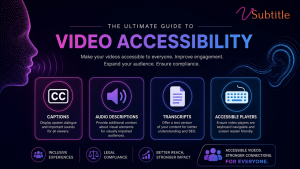
To make a video truly accessible, you must address four key areas:
Pillar 1: Accurate Closed Captions (CC)
Captions are the most visible part of accessibility. In 2026, “auto-generated” is no longer enough if the accuracy is low.
Requirement: Captions must be synchronized, accurate, and include non-speech information (like [Music playing] or [Door slams]).
Pro Tip: Use vSubtitle’s AI engine to achieve 97.8% accuracy, significantly reducing the manual cleanup required for compliance.
Pillar 2: Audio Descriptions (AD)
Audio descriptions provide a narrated track of the visual elements in a video for users who are blind or have low vision.
- Requirement: Describe key visual actions, facial expressions, and scene changes that aren’t captured in the dialogue.
- Implementation: You can provide a separate video with AD or use a player that supports an optional AD audio track.
Pillar 3: Full Text Transcripts
A transcript is a text version of everything said in the video, plus descriptions of visual information.
- Benefit: Transcripts are not only great for accessibility but are a goldmine for SEO. They allow search engines to index every word of your video content.
- Best Practice: Host the transcript directly on the page below the video player.
Pillar 4: Accessible Video Players
Even if your video has captions, it’s not accessible if the player itself can’t be used by someone with a disability.
- Requirement: The player must be fully navigable via keyboard (no mouse required) and compatible with screen readers.
- Avoid: Auto-playing videos with sound, which can be disorienting for users with cognitive disabilities or those using screen readers.
4. The “Silent Search” Revolution: Accessibility as SEO
One of the most unique trends of 2026 is the rise of “Silent Search.” As AI answer engines (like ChatGPT and Google AI Overviews) become the primary way people find information, they rely heavily on the text data associated with videos.
When you provide accurate captions and transcripts, you are feeding these AI models the high-quality data they need to recommend your video. In 2026, accessibility = discoverability.
5. Step-by-Step Implementation Checklist
Ready to make your content accessible? Follow this 2026 checklist:
- Audit Existing Content: Identify your most-watched videos that lack captions or transcripts.
- Choose the Right Format: Use SRT for social media and VTT for web-based players.
- Verify Accuracy: Ensure your captions meet the 97%+ accuracy threshold required for professional and legal standards.
- Add Audio Descriptions: For high-value marketing or educational content, include an AD track.
- Test with Assistive Tech: Try navigating your video player using only your keyboard or a free screen reader like NVDA.
- Provide a Feedback Loop: Include a clear way for users to report accessibility issues on your site.
6. How vSubtitle Simplifies 2026 Compliance
The biggest barrier to accessibility has always been time and cost. vSubtitle was built to remove those barriers.
- Speed: Process hours of video in minutes.
- Accuracy: Our neural networks are trained on 100+ languages to ensure your message is never lost in translation.
- Collaboration: Use our team review workflows to ensure every caption meets your brand’s quality standards.
Frequently Asked Questions (FAQ)
1. Is closed captioning a legal requirement for all videos?
In 2026, it depends on your industry. For government, education, and many healthcare sectors, it is a strict legal requirement under ADA Title II. For private businesses, while not always a “law” for every single video, it is a standard requirement for web accessibility (WCAG) and is often required to avoid discrimination lawsuits.
2. What is the difference between Open Captions and Closed Captions?
Closed Captions (CC) can be turned on or off by the viewer and are usually uploaded as a separate file (like an SRT). Open Captions are “burnt-in” to the video and cannot be turned off. For accessibility, Closed Captions are preferred as they are readable by screen readers.
3. How much does it cost to make a video accessible?
With AI tools like vSubtitle, the cost has dropped significantly. Instead of paying dollars per minute for manual transcription, you can now process videos for cents per minute with higher accuracy than ever before.
4. Do captions help with YouTube SEO?
Absolutely. YouTube’s algorithm uses the text in your caption files to understand the content of your video. This helps your video show up in relevant searches and “Suggested Video” sidebars.
5. What is the best font for subtitle readability?
For maximum accessibility, use sans-serif fonts like Arial, Helvetica, or Roboto. Ensure there is a high contrast between the text and the background (e.g., white text on a black semi-transparent box).
Conclusion: The Future is Inclusive
As we look toward the rest of 2026 and beyond, the gap between “accessible” and “inaccessible” content will only widen. Creators who embrace accessibility today are not just avoiding legal trouble—they are building a more loyal, engaged, and global audience.
Start your accessibility journey with vSubtitle for free today.

